

Most agencies spend hours building an SEO proposal.
Pulling Ahrefs exports. Screenshotting map grids. Writing the same scope of work for the hundredth time. Then the prospect says "let me think about it."
The Agency OS SEO proposal generator builds the whole deck from the prospect's own data in about five minutes. But it doesn't do it alone. It stops at every decision and hands it to you.
This is the exact workflow inside the tool: every step, every slide, where the data comes from and the logic behind it.
Here's the short version:
- It starts from a lead in your pipeline, with your discovery call notes attached.
- It pulls the prospect's keywords, links, top pages, two years of traffic, competitors and AI citations from their website.
- It stops at four gates: context, angle, outline and review. You make the call at each one.
- It has 19 sections. A section with no data behind it doesn't draw.
- Every number on a slide comes from the pulled data. Nothing is invented.
What Is the Agency OS SEO Proposal Generator?
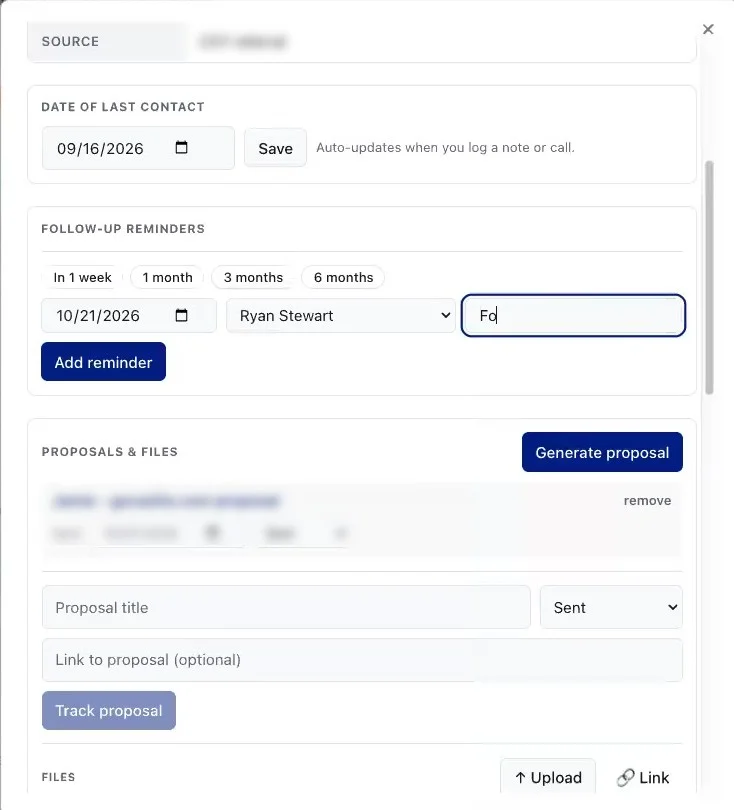
The SEO proposal generator is a tool in Agency OS that turns a discovery call and a prospect's own search data into a finished proposal deck. It lives under Tools as the Proposal Builder.
It reads what the prospect told you on the call. Then it reads what Ahrefs, the rank trackers and the site itself say about them.
From there it proposes ways to pitch the deal, lets you choose the angle and the slides, and builds the deck.
If you want the sales side of this, what goes on each slide and how to price it, read our SEO proposal guide. This post is about what happens inside the tool.
The Rules Every Proposal Follows
| Rule | What it means on the slide |
|---|---|
| Stop at every gate | It never chains the whole flow into one finished deck |
| Every number from the data | No invented figures, comparisons or projections |
| Write to the prospect | Second person: "you rank for," never "they" |
| Short and specific | Headlines under 120 characters, at most five points |
| No promises | It argues what the data says, not what the work will produce |
| Weaknesses are opportunities | A proposal sells the plan. It is not an audit |
| No data, no slide | It says what data would unlock a section instead of filling it with text |
These rules are written into the tool. The AI follows them at every gate.
The first one matters most. The strategist's choices are what make the proposal theirs. So it stops and waits for you, every time.
The second one is why you can trust the deck in front of a prospect. If a number is on a slide, it came from their data.
How the Proposal Generator Works, Step by Step
Pick the lead and the service. The tool pulls the prospect's data.
Context, angle, outline and review. You decide at each one.
The deck builds, you revise it, and it goes out.
Here's every step, in the order the tool runs them.
Step 1: Start the Proposal From the Lead
SEO proposal
- ✓Argues from what the prospect already ranks for
- ✓Organic, map pack and AI search
- ✓Forecast from their own traffic
Paid digital proposal
- ✓Argues from what the market costs
- ✓Google Ads, LSA, Meta and more
- ✓Forecast from a budget
Open the lead in your pipeline and click Generate proposal. The discovery call notes come with it.
Then pick the service: SEO, paid digital, or both in one deck.
An SEO proposal argues from what the prospect already ranks for. A paid proposal argues from what the market costs and what a budget would buy. That choice sets which slides are available and how the forecast works.
Step 2: Pull the Prospect's Data
| What it pulls | Where from |
|---|---|
| Keywords and rankings | Ahrefs or Semrush |
| Two years of traffic | Ahrefs or Semrush |
| Top pages | Ahrefs or Semrush |
| Referring domains | Ahrefs or Semrush |
| Competitors | Ahrefs or Semrush |
| AI citations | Ahrefs |
| Sitemap and on-page signals | The prospect's website |
| Map pack grid | Local Falcon, or a grid import |
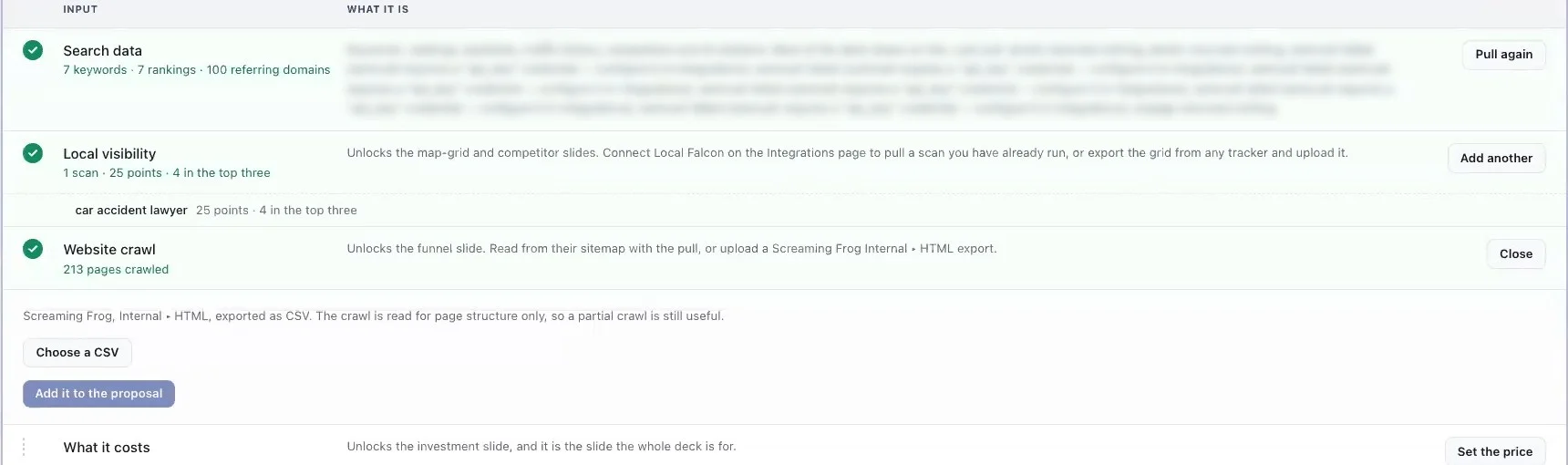
The tool pulls everything from the website on the lead. It runs in the background and comes back when the data lands.
If you have Local Falcon connected, it finds the prospect among your tracked businesses and scans the map pack.
You can also import hand exports: a map grid scan, a Google Business Profile competitor export or a crawl. Those are kept even when you re-pull the data.
Step 3: Confirm the Context (Gate 1)
The first gate shows you what the pull found. Traffic now and at its peak, rankings, keywords on page one, keywords in striking distance, referring domains, AI citations and map grid scans.
It also flags every gap, and whose gap it is.
Your agency name, logo and brand color are set once in Settings and used on every deck. Everything else, like what you're selling and the price, belongs to this proposal only.
This is also where you add what the prospect told you that the data doesn't show: pain points, goals, the practice area.
Step 4: Choose the Angle (Gate 2)
The angle is the argument the proposal makes. "Your traffic dropped 80% and here's why." "You rank, but not where the cases are." That kind of thing.
The tool builds draft angles straight from the data. Each one shows the evidence it rests on.
Then the AI writes two or three sharper angles from that evidence, each with a title, a one-paragraph case citing specific numbers and up to five points.
You choose. The angle you put first opens the executive summary.
Step 5: Approve the Outline (Gate 3)
Each one shows whether it can draw from the data as it stands.
Drop sections that undercut the angle. Rewrite the key points on the ones you keep.
The outline gate lists every section in order. Each one shows whether the data supports it, and if not, what it needs.
You set the order and drop anything that undercuts your angle. For the sections you keep, you can rewrite the headline and two to four key points.
You can also set the monthly price here. Approving the outline builds the deck.
Step 6: Review and Revise the Deck (Gate 4)
Data blocks
- ✓Charts, map grids, the competitor matrix, page audits
- ✓Redrawn from the pull on every build
- ✓Change what feeds them, or hide the slide
Your blocks
- ✓Headlines, notes and the plan
- ✓Edit, add or hide slides
- ✓Price the plan line by line
Now you walk through the deck section by section: where the prospect stands, the argument, the plan and the close.
Some content is data. Charts, map grids, the competitor matrix and page audits are redrawn from the pull every time the deck builds. You don't edit those by hand. You change the data behind them, or hide the slide.
Everything else is yours. Edit any block, add a slide, hide one (it's reversible) or price the plan in lines, monthly or one-off.
Step 7: Download, Present and Send
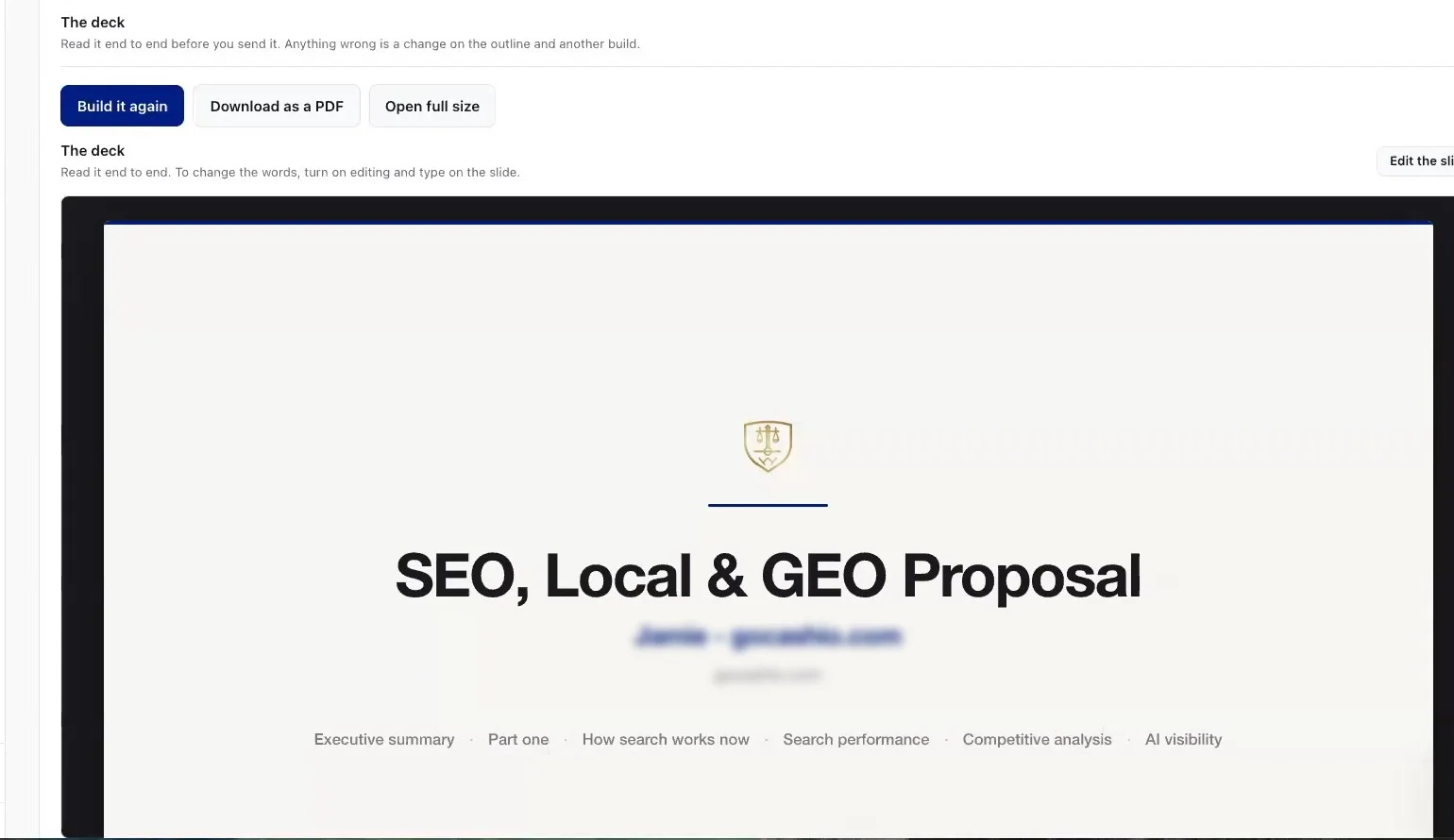
When you're happy, download the PDF or open it full size to present on the call.
Then send it. The lead moves to Proposal Sent in your pipeline, so the follow-up doesn't fall through the cracks.
Need to go back a step? You can reopen the proposal at any earlier gate.
Every Slide in the SEO Proposal, and the Data Behind It
| Part | Sections |
|---|---|
| Opening | Cover, executive summary |
| Part one: current performance | How search works now, traffic, competitors, AI visibility, AI readability, map pack, on-page review, content gap, buying journey, top pages, authority |
| Part two: plan of attack | Scope of work, the plan by month, the forecast |
| Close | Next steps |
The SEO deck has 19 sections in a fixed catalog order. Two of them are dividers: "Current performance" opens part one and "The plan of attack" opens part two.
Here's every section, what it shows and the data it needs to draw. The slide images are from a real WEBRIS proposal, with the firm's name removed.
Cover
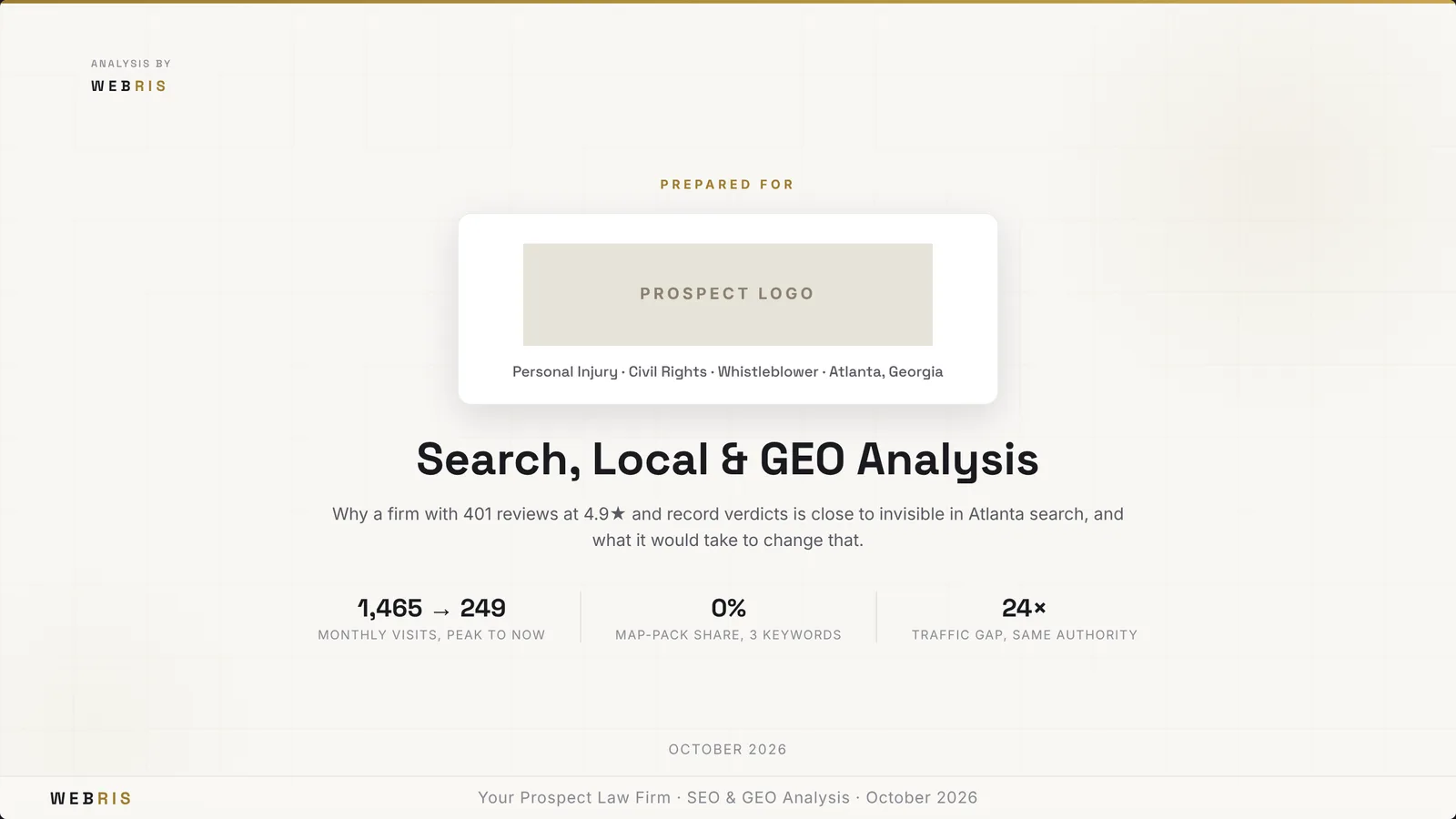
Always included. The prospect's name, the proposal title and the date, with your branding.
Executive Summary
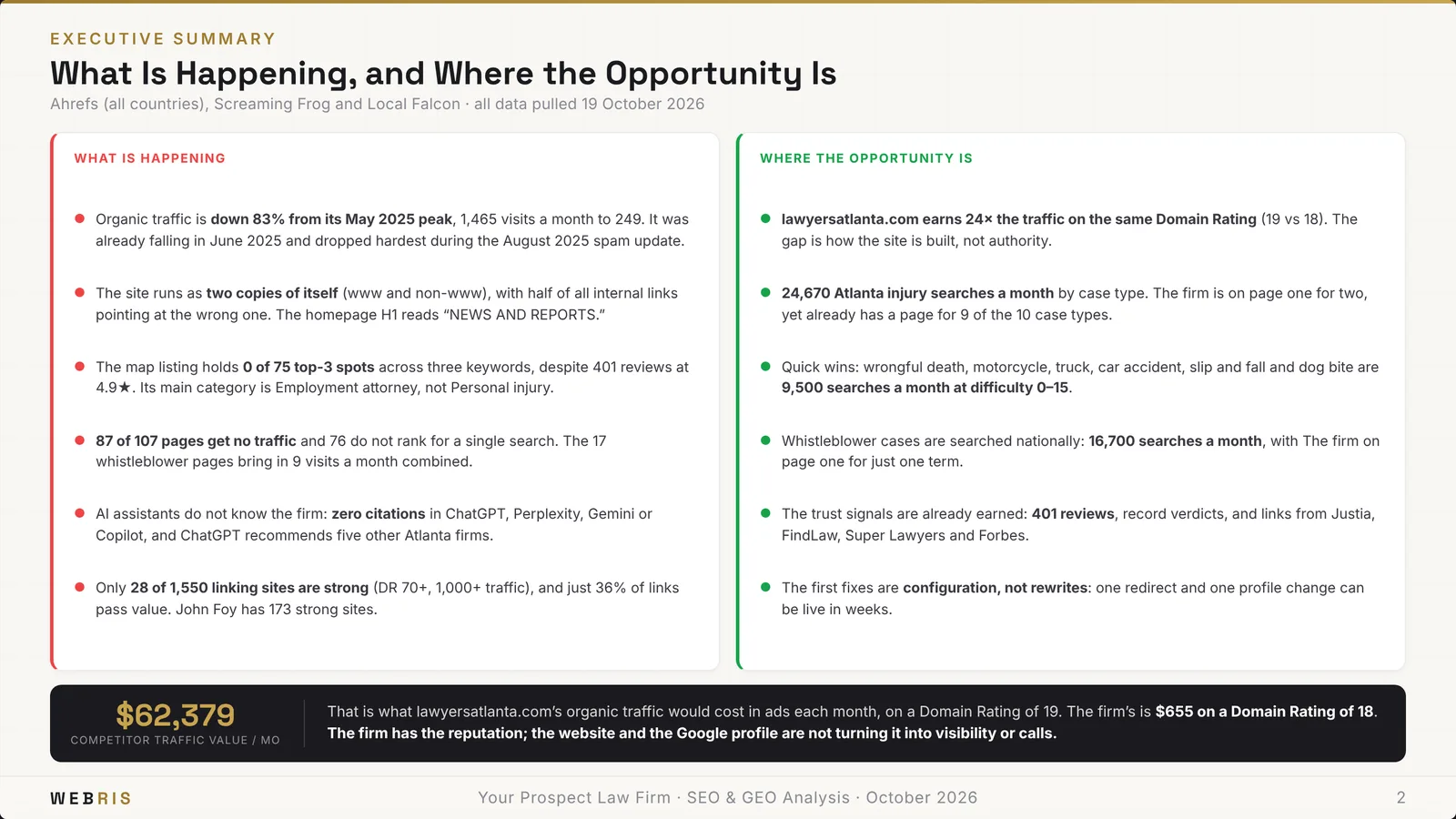
Always included. It leads with the angle you chose at gate two.
It covers who the prospect is, the problem, the opportunity, the risk of doing nothing and what winning is worth.
How Search Works Now
Organic listings, won with pages, depth and authority.
Decided by the Business Profile, reviews and proximity.
ChatGPT, Perplexity, Gemini and Google's AI answers.
Always included. It explains that search is now three surfaces, and each one is a different job.
Pages and links win the website. Profile, proximity and reviews win the map. Structure, markup and quotable answers win AI. Everything after this slide measures one of the three.
Organic Traffic and What It Is Worth
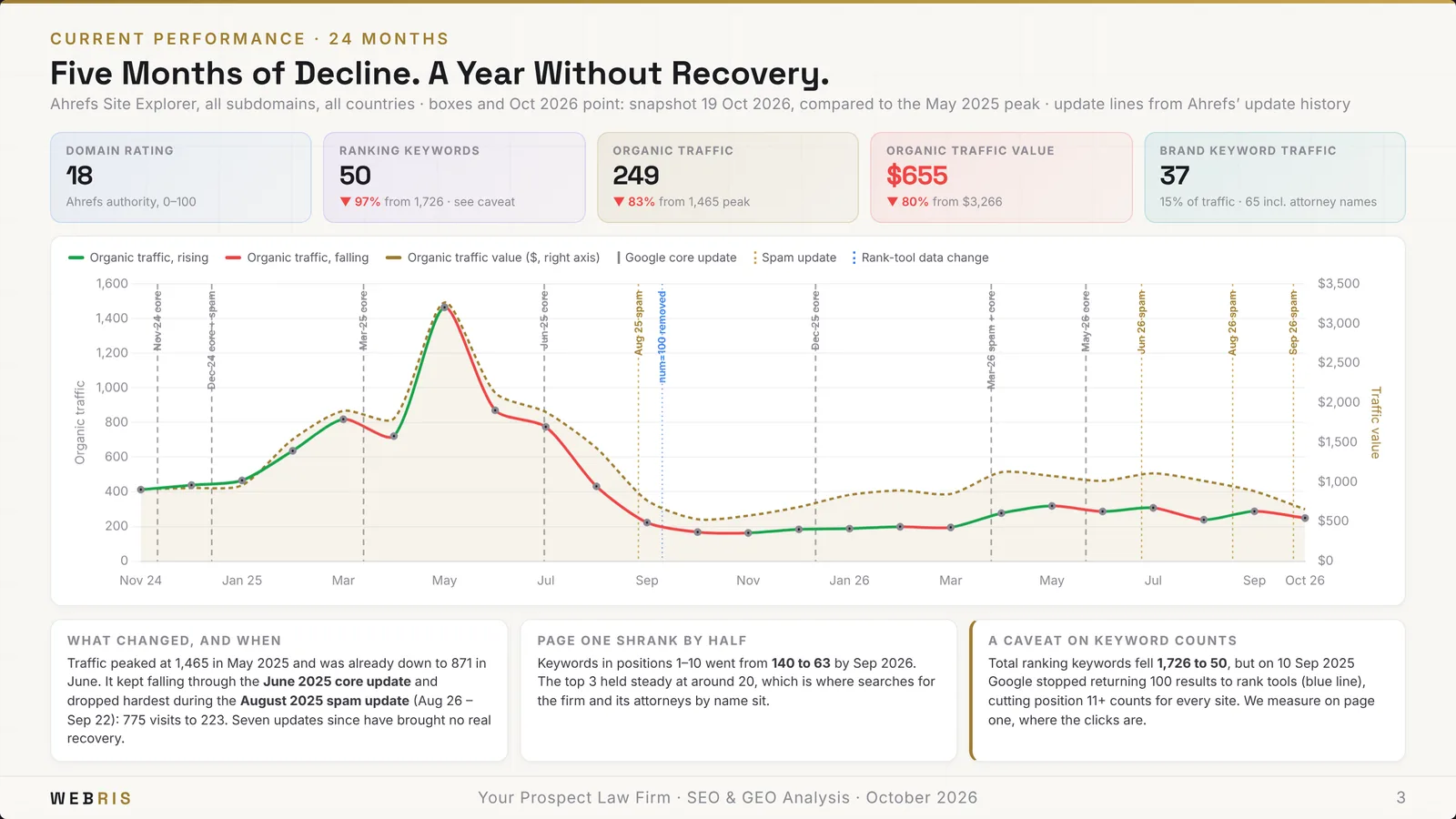
Needs three months of traffic history, or at least a current traffic figure. It charts where the traffic has been and what it's worth.
The Firms You Lose To
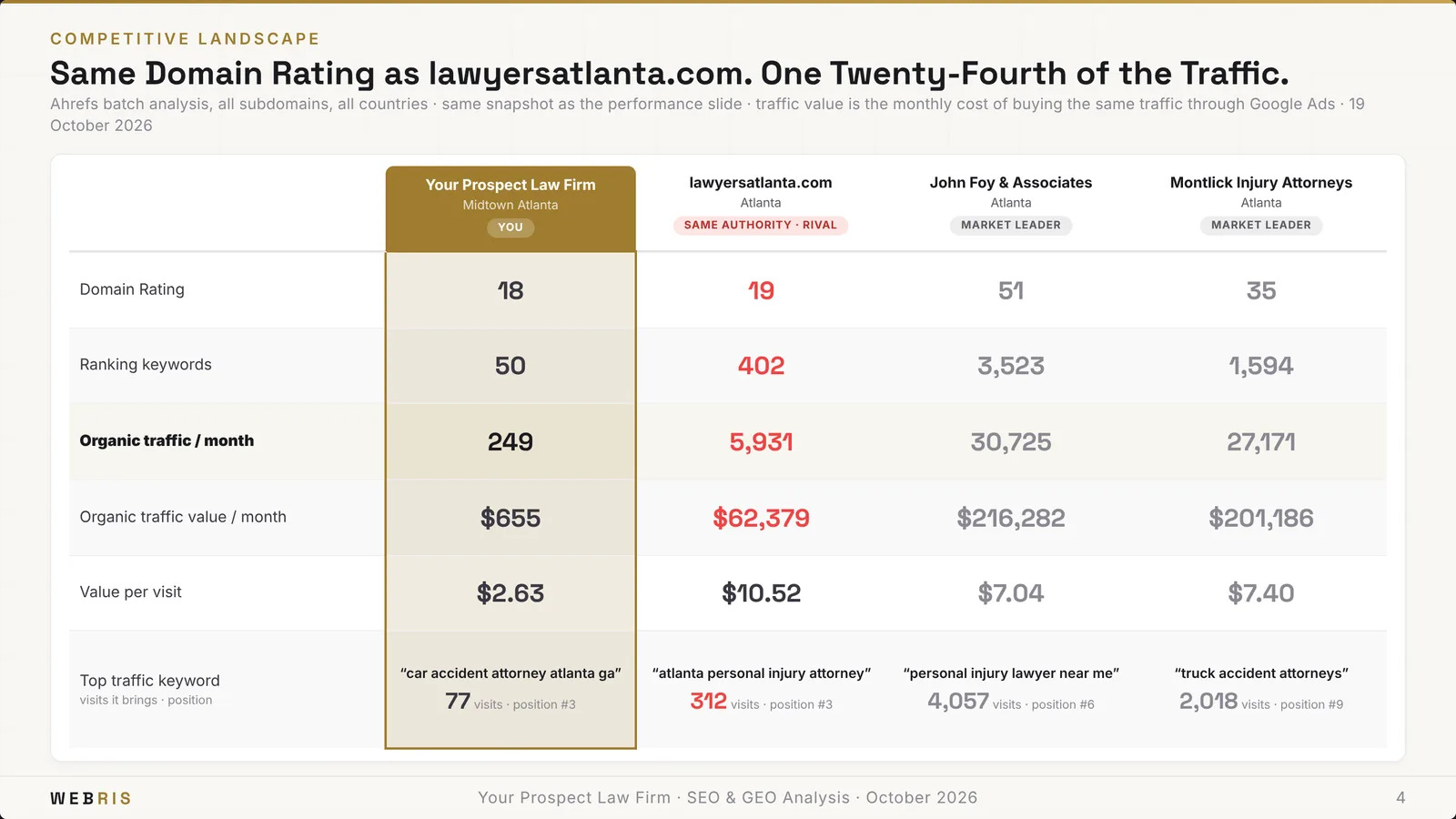
Needs a competitive set from the pull: the prospect's domain plus their rivals. It puts them side by side.
AI Search Visibility
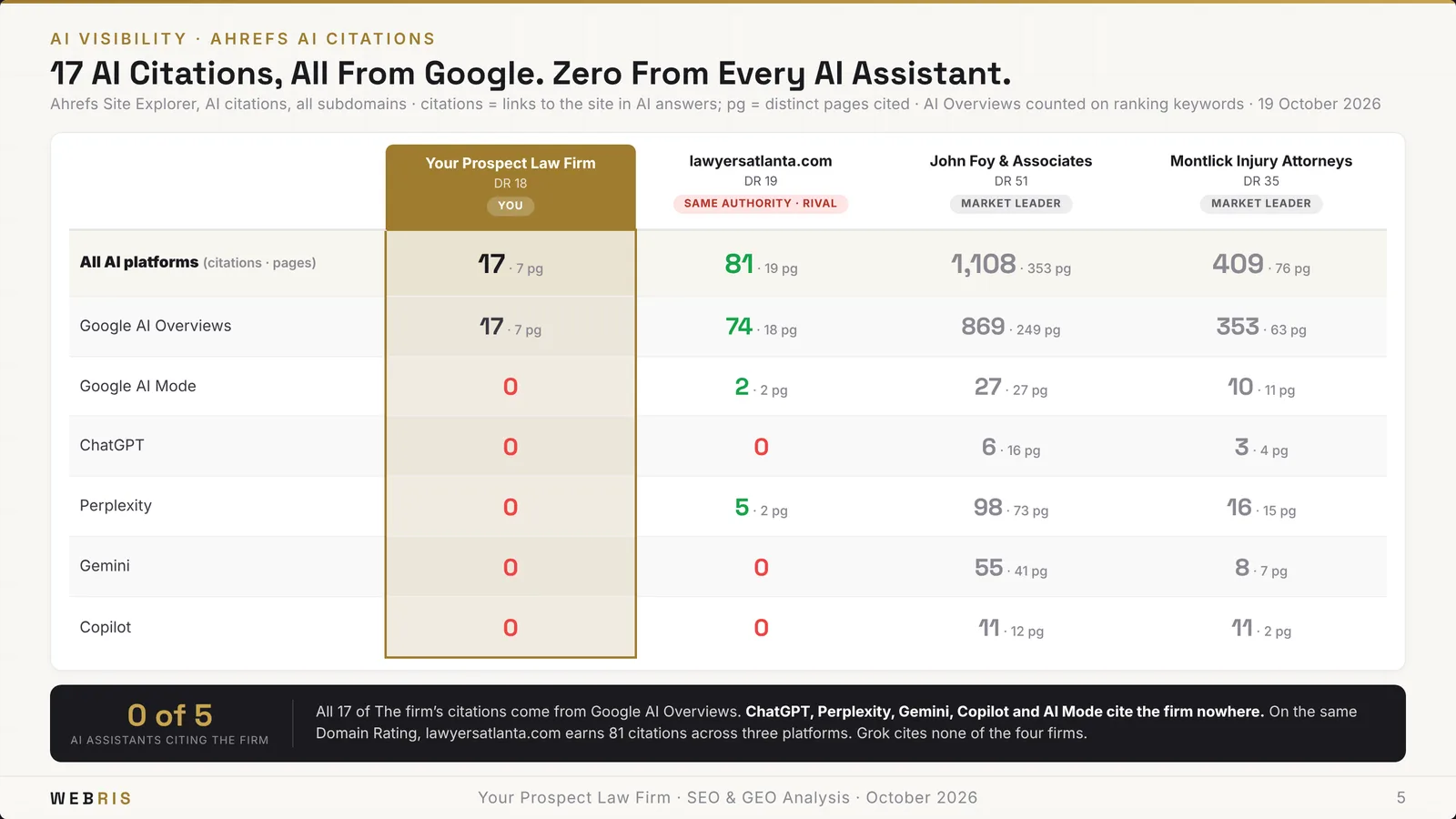
Needs an AI citation pull from Ahrefs. It shows how often AI platforms cite the prospect versus their competitors.
Whether AI Engines Can Read the Site
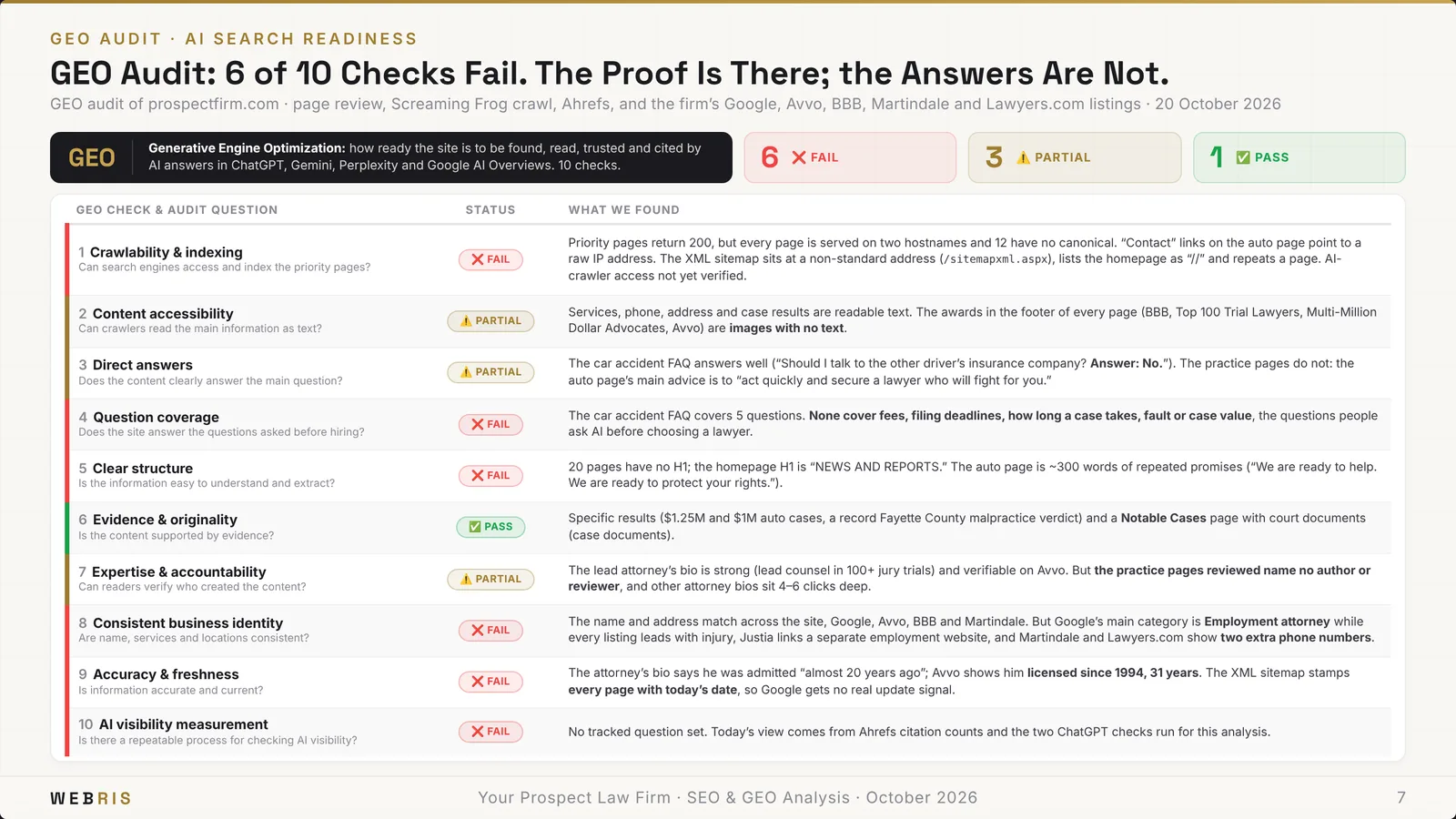
Needs an on-page pull. It checks robots rules, llms.txt and the signals AI engines use to retrieve a page.
Map Pack, Market by Market
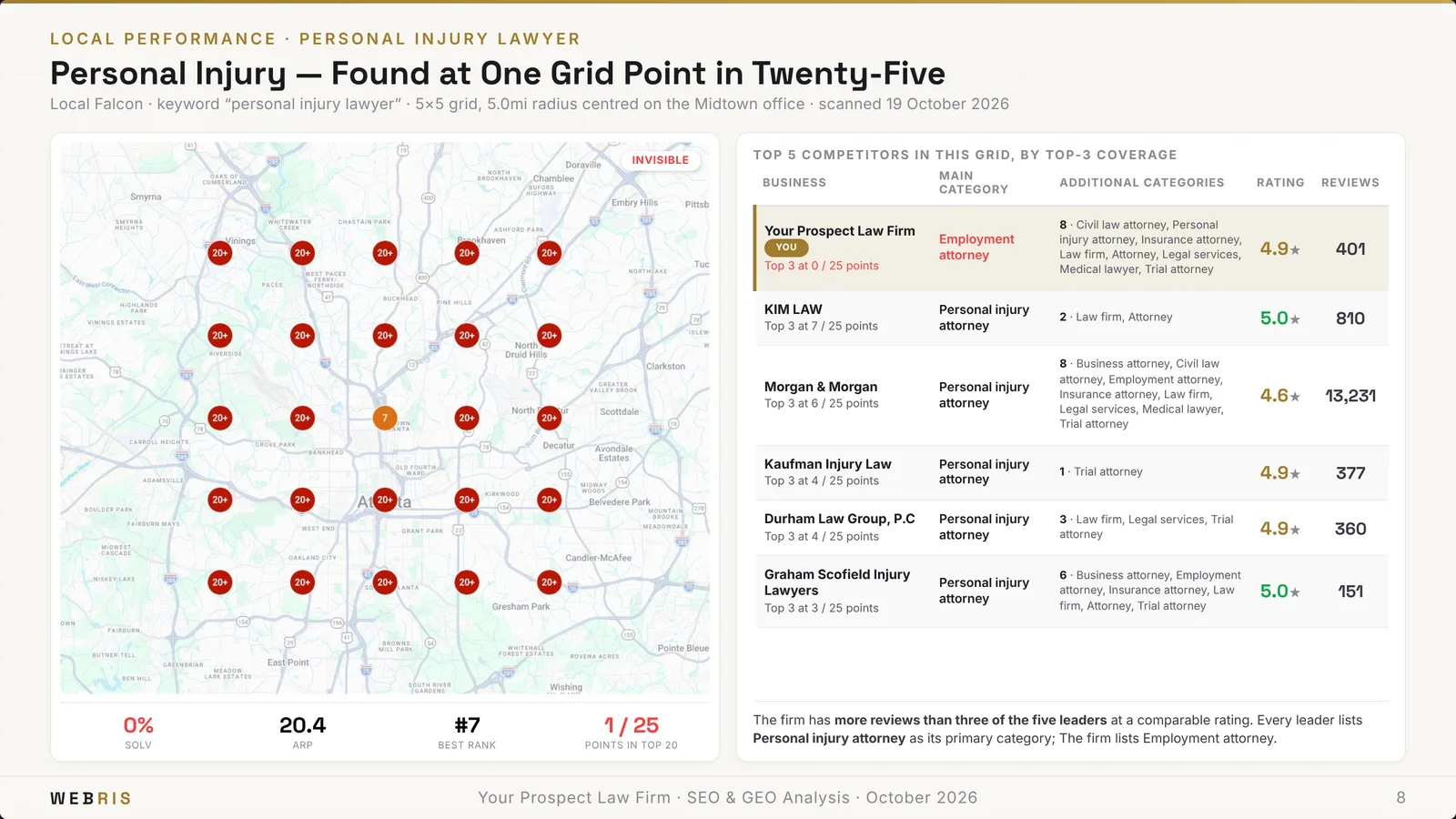
Needs a map grid scan, from Local Falcon or an imported grid. One grid per keyword and market, next to the competitors who win the map. More in our local SEO guide.
Deep On-Page Review
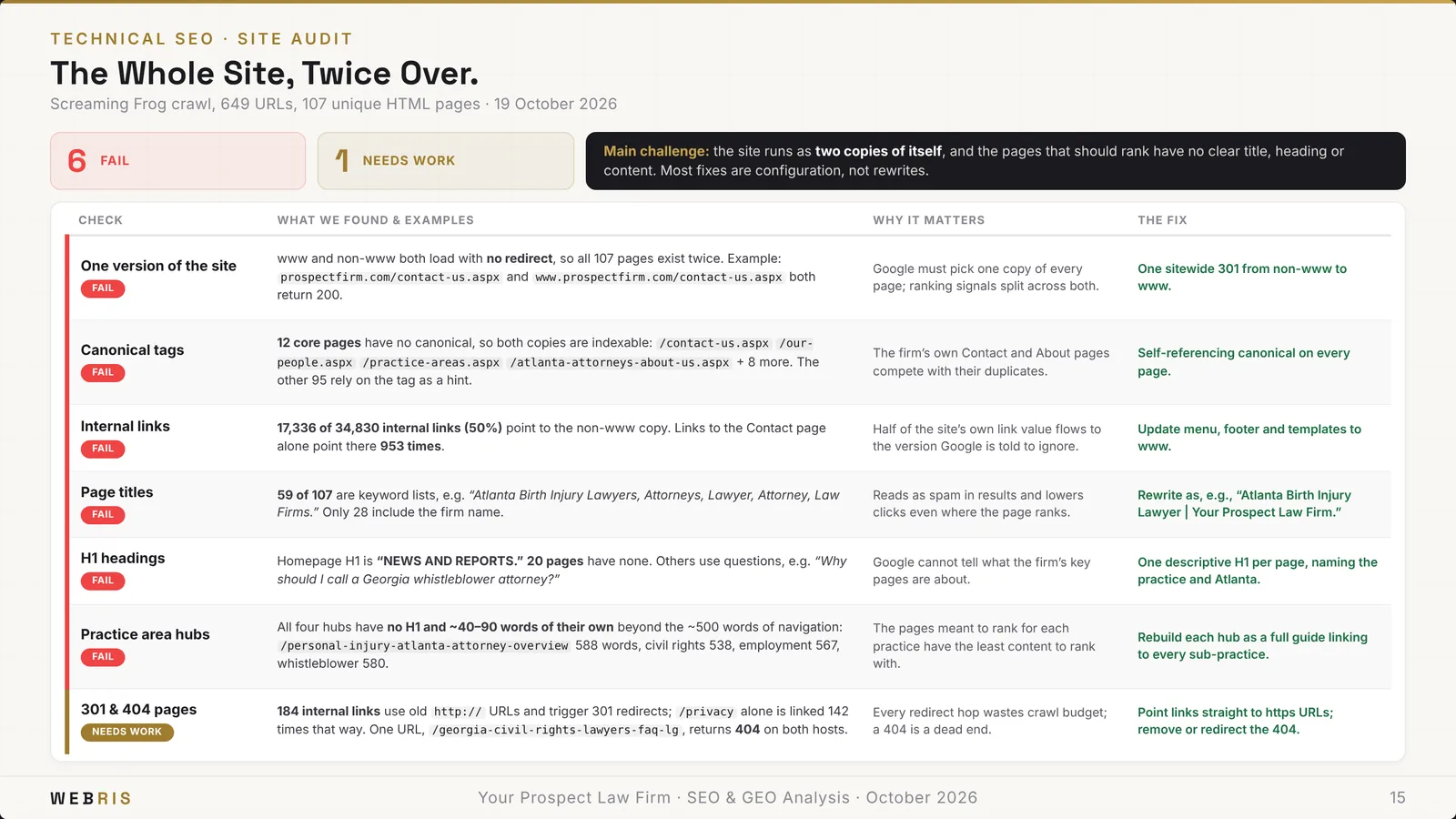
Needs an on-page pull that includes a money page or an article. Every issue sits next to its fix.
Content Gap Against the Market
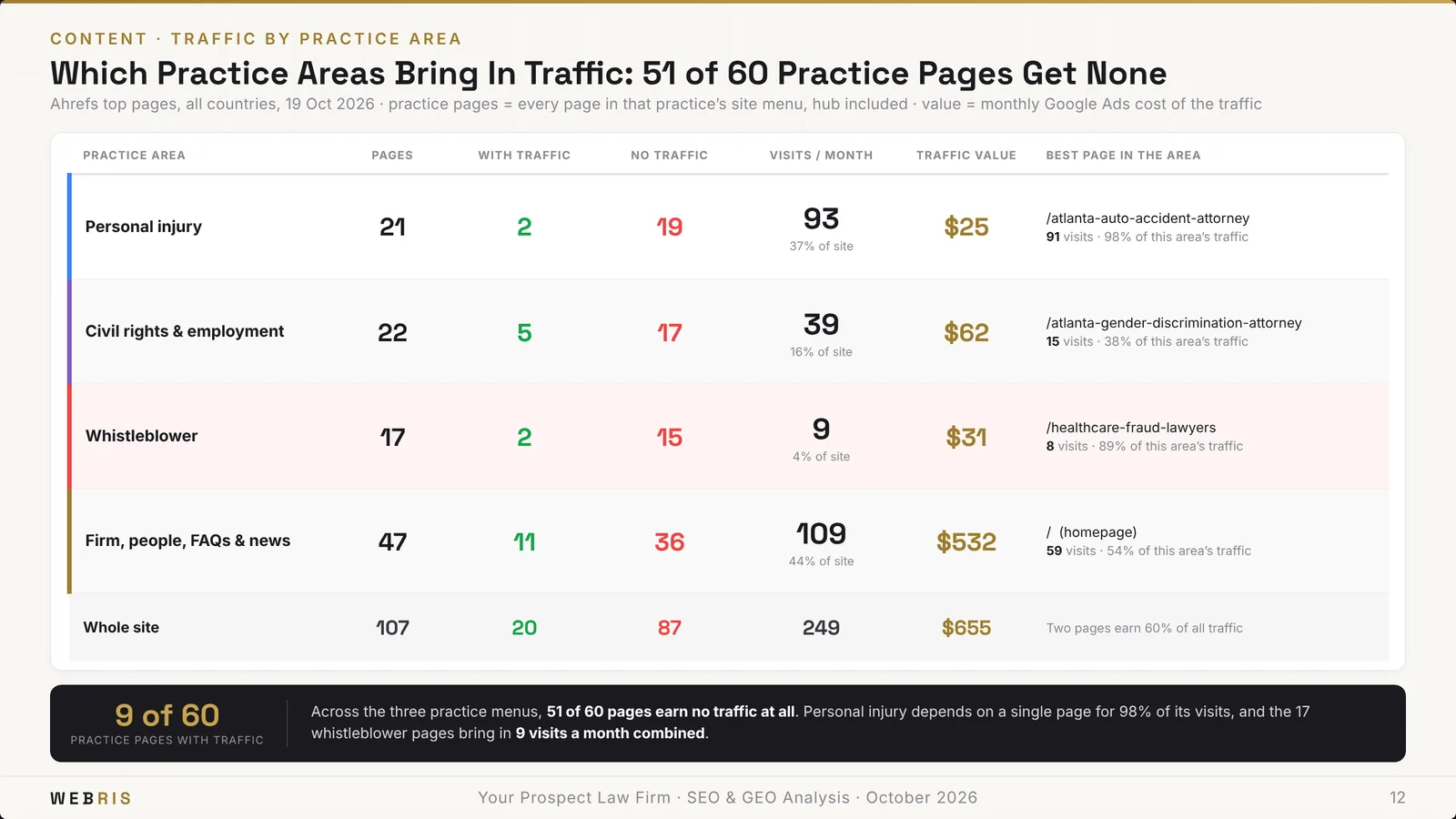
Needs crawled pages and a competitive set. It shows what competitors cover that the prospect doesn't.
Where Your Keywords Sit in the Buying Journey
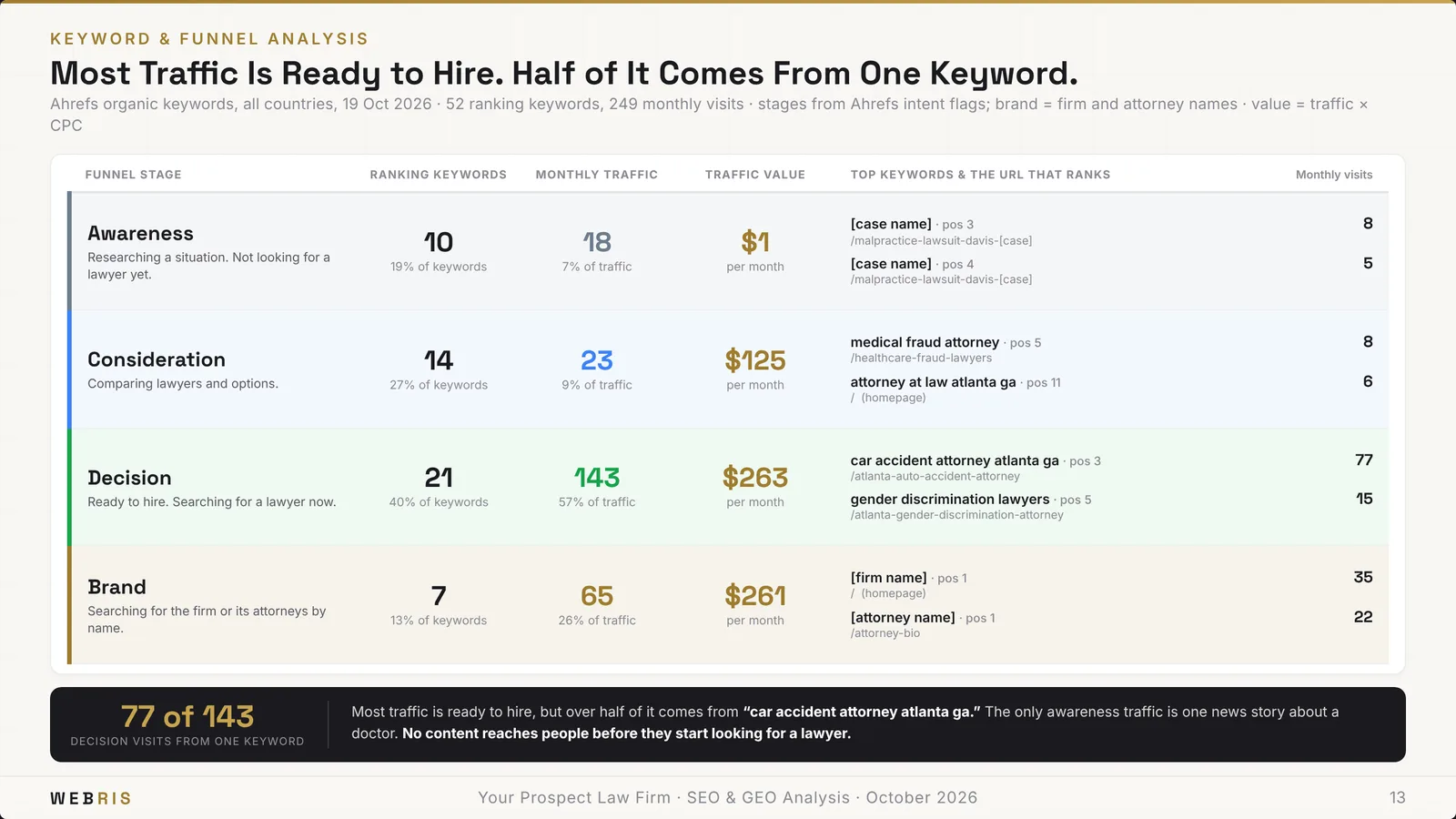
Needs at least eight organic rankings. It sorts them into awareness, consideration, decision and brand, so you can show how much traffic is actually ready to hire.
The Pages Carrying the Site
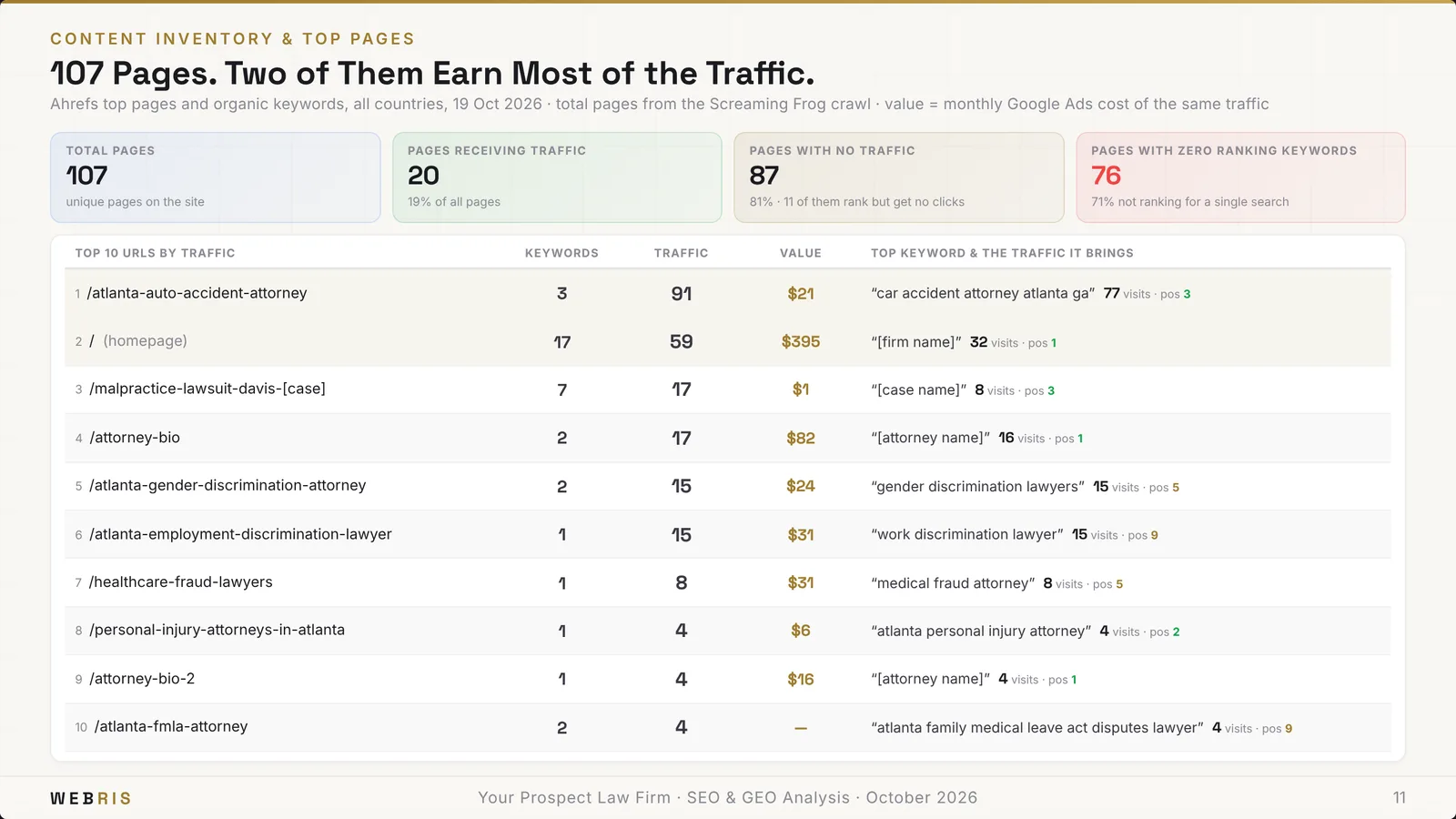
Needs page-level traffic from the pull. Usually a handful of pages carry the whole site, and this slide proves it.
Authority Against the Market
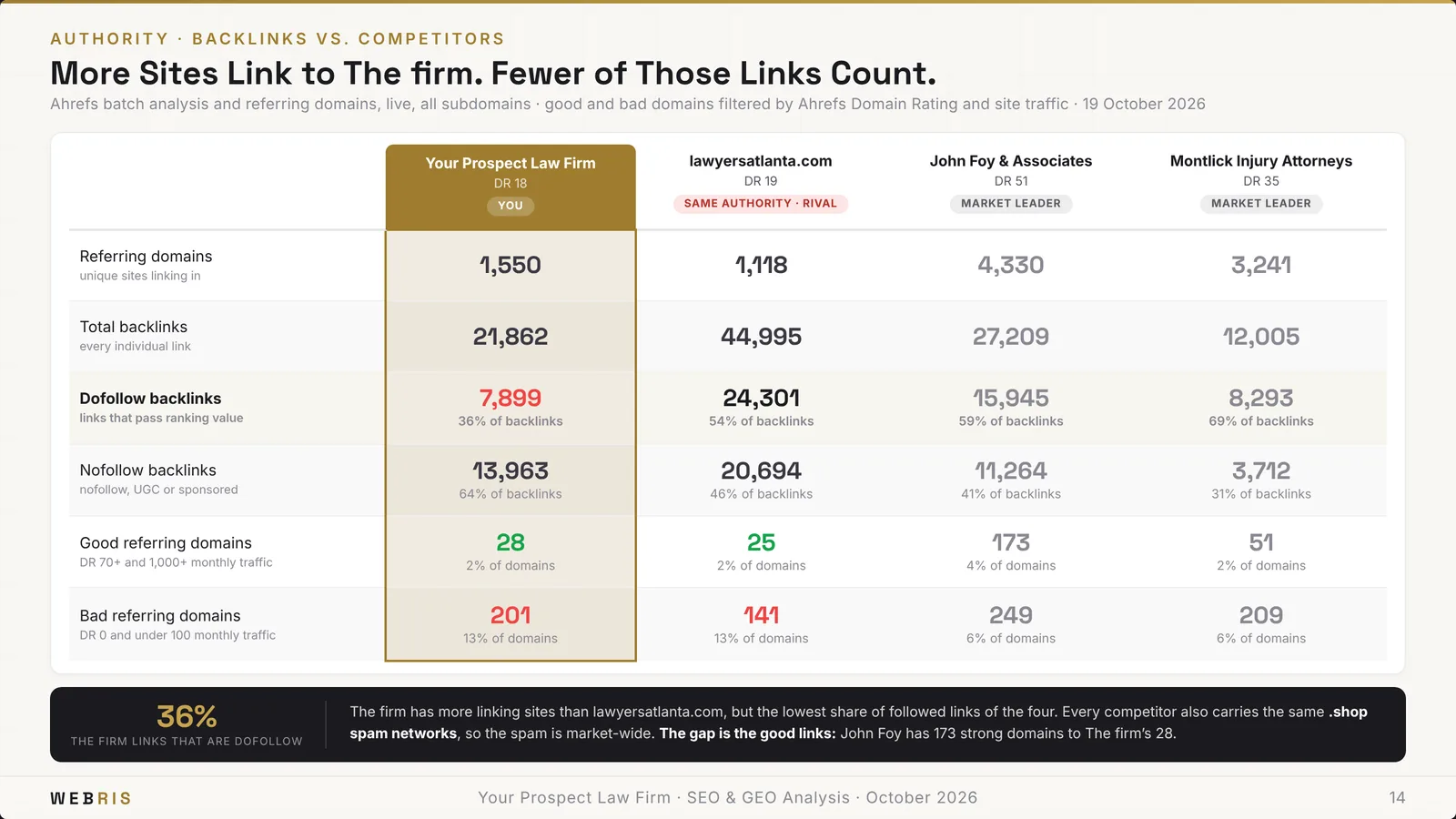
Needs a competitive set and referring-domain data. It compares the prospect's link profile to the market's.
Scope of Work
| Workstream | When |
|---|---|
| Analytics and attribution | Month 1, then monthly |
| Technical foundation | Months 1 to 3, then ongoing |
| Local and map pack | Months 1 to 3, then recurring |
| Content | Strategy in month 1, writing from month 2 |
| GEO and AI visibility | Months 1 to 3, then recurring |
| Links and authority | Strategy in month 1, outreach from month 2 |
Always included. Six workstreams run in parallel, and every line answers something measured in part one.
Each workstream lists what's in it, from call tracking and Core Web Vitals to review generation, schema and digital PR. Our list of SEO deliverables goes deeper on each.
What We Would Do, and When
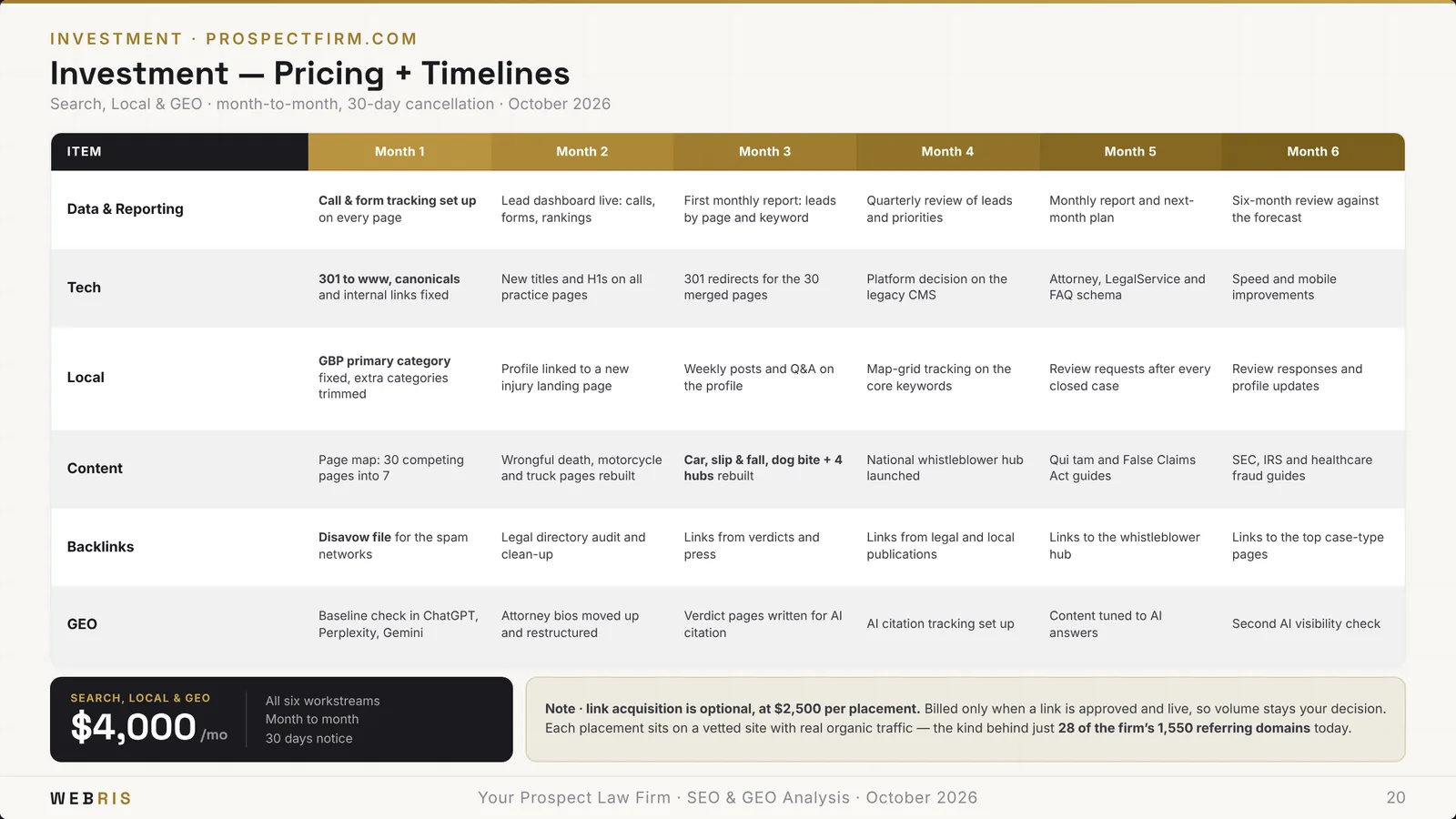
Always included. A month-by-month timeline with one row per workstream, set month to month with 30 days' notice and no long-term contract.
The default plan includes 20,000 words of content a month from month two. You can change any cell.
What It Is Worth If It Works
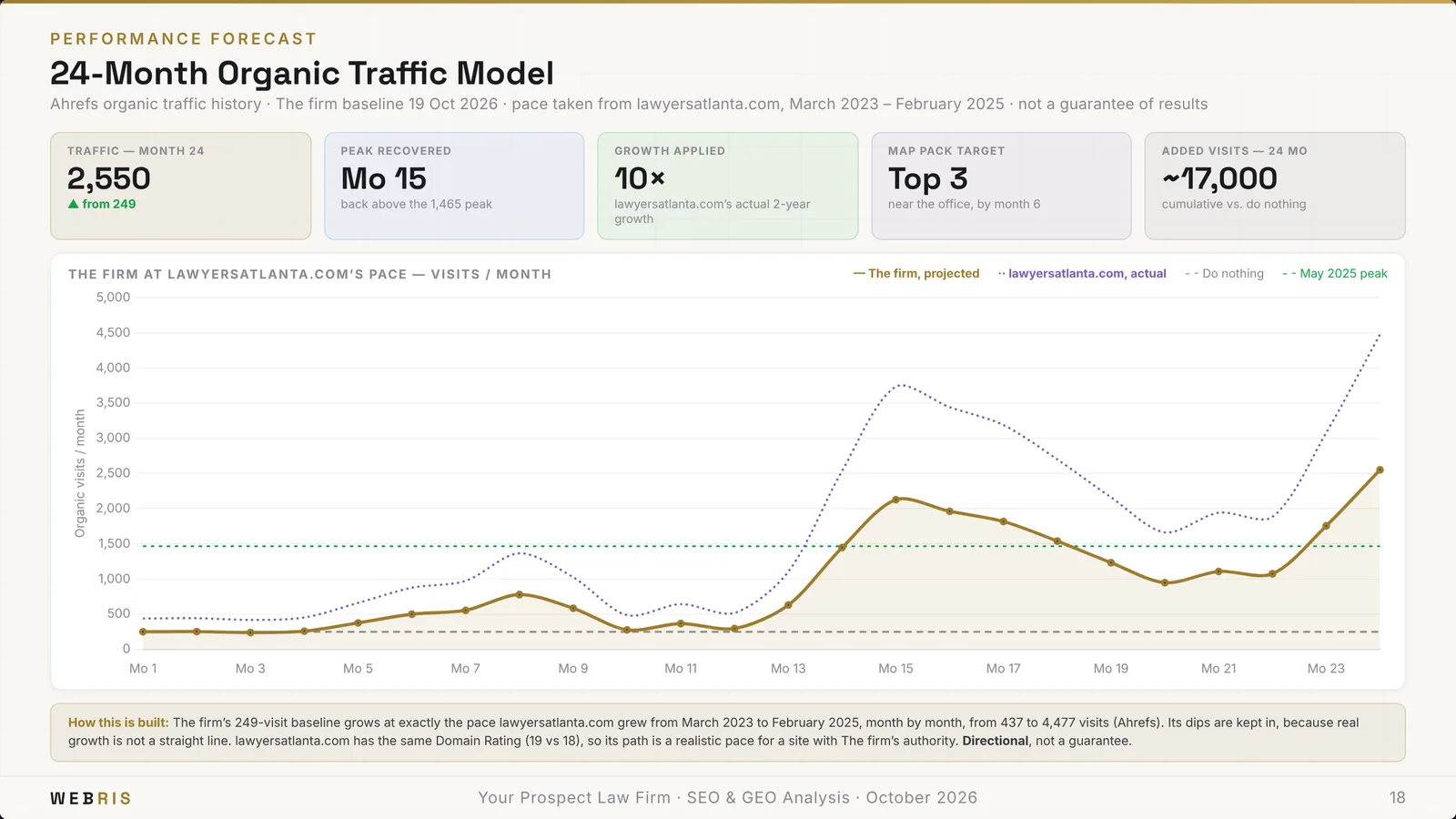
Needs current organic traffic above zero. The default forecast assumes 2% of visits become leads and 25% of leads become cases. You can change both.
It's labeled as directional. The deck argues what the data says, and never promises a result. Here's how we think about the math in how to calculate SEO ROI.
Next Steps
Always included. Three steps that make saying yes easy: approve, kick off, and start the month-one audit.
Why a Section Disappears When the Data Is Missing
What most proposal tools do
- ✕Fill every slide, data or not
- ✕Guess at missing numbers
- ✕Look the same for every prospect
What the generator does
- ✓Draws only the sections the data supports
- ✓Tells you what data would unlock the rest
- ✓Every number traces back to the pull
A section with no data doesn't draw. No map grid means no map pack slide. Fewer than eight rankings means no buying-journey slide.
The tool doesn't paper over the gap with text. It tells you exactly what data would unlock it, so you can go get it.
I'll be honest: that means some decks come out shorter. That's the point. One made-up number in front of a prospect costs you the deal.
Run the Whole Thing From Claude
Everything above works in the app. It also works as a conversation.
Agency OS connects to Claude, or to ChatGPT through the MCP. Claude walks you through each gate and stops for your call, the same way the app does.
Ask it what the pull found. Ask for three angles. Tell it to drop a slide or reprice the plan. It updates the proposal in Agency OS as you go.
Paid digital proposals run through the same gates, with a forecast built from spend and click prices instead. More on running the platform in Agency OS.
Build Your Next Proposal in Five Minutes
The SEO proposal generator is built into Agency OS, included with The Blueprint Training, along with the sales training and real sales call recordings that go with it.
Join The Blueprint Training →