

Every client is asking the same question right now.
"Are we showing up in ChatGPT?"
Most agencies answer with a screenshot of one prompt they typed that morning. That's not tracking. That's an anecdote.
How do you track AI search visibility? Combine three kinds of data: what the platforms report themselves (Google Search Console and Bing Webmaster Tools), what your own analytics capture (AI referral traffic, AI bot visits and self-reported leads), and sampled prompts run on a schedule by a tracking tool. No single source is complete, so report all three and watch the trend, not any one number.
The data works nothing like keyword rankings. This post covers every option, how each one is pulled, and how much you can trust it.
Here's the short version:
- There's no "rank" in AI search. Answers change by person, wording, location and day.
- Platform data is the most reliable, and the most limited. Google and Bing now report AI impressions or citations, without clicks.
- Your own analytics are exact, but only for clicks. Most AI answers never get clicked.
- Prompt trackers show the zero-click picture, but they're samples. Treat them like a poll, not a census.
- Report the trend over three months. Month-to-month swings are mostly noise.
| Source | How it’s pulled | What it shows |
|---|---|---|
| Platform-reported | Google and Bing report it to you | AI impressions and citations |
| Your own analytics | Captured on the client’s site | AI clicks, AI bot visits, AI-sourced leads |
| Sampled prompts | A tool runs prompts on a schedule | Who gets named in answers nobody clicks |
Why AI Visibility Isn't Like Keyword Rankings
A keyword ranking is one position on one results page that everyone in a location mostly sees the same way. An AI answer is generated fresh every time, so there's no single position to track.
Ask ChatGPT the same question twice and you can get two different answers. Ask it from a different city, logged in with a different history, or worded slightly differently, and the brands it names can change.
That breaks the way you're used to measuring search. It's also why selling blended search beats promising clients a ranking.
Keyword rankings
- ✕One position per keyword
- ✕Mostly the same for everyone in a city
- ✕Impressions and clicks in Search Console
- ✕Stable day to day
AI answers
- ✓No fixed position
- ✓Changes by person, wording and history
- ✓Most platforms report nothing to site owners
- ✓Different answer on every run
Three things make AI visibility harder to measure:
- No impressions data from most platforms. ChatGPT, Perplexity and Claude don't tell site owners how often they were shown.
- Most answers never get clicked. The client can be recommended and you'll never see a session.
- Answers aren't deterministic. The same prompt produces different answers on different runs.
Read that again. Any single check is a sample. The only honest way to report it is as a trend.
The Three Ways GEO Data Gets Pulled
Every AI visibility number you'll ever see comes from one of three places.
- Platform-reported: the search engine tells you directly. Google and Bing do this now.
- Your own analytics: you capture it on the client's site. Referral traffic, bot visits, intake forms.
- Sampled prompts: a tool runs prompts through the AI platforms on a schedule and records who gets named.
Each one answers a different question. You need all three.
Option 1: Platform-Reported Data
Platform data comes straight from the search engine. It's the most reliable data you can get, because nobody is estimating it. It's also the most limited.
- ✓Google Search ConsoleAI Overviews and AI Mode impressions
- ✓Bing Webmaster ToolsCopilot citations and grounding queries
Google Search Console's Generative AI Report
Google announced Search Generative AI performance reports in Search Console on June 3, 2026, giving a separate view of how often a site's pages appear in AI Overviews and AI Mode. According to Google's Search Central announcement, the view covers generative AI features in Search and in Discover.
At launch, the report showed impressions by page, country, device and date. It did not show clicks or queries, and it rolled out to a subset of sites first.
| Search Console generative AI report | At launch (Jun 3, 2026) |
|---|---|
| Impressions | ✓ By page, country, device and date |
| Surfaces | ✓ AI Overviews and AI Mode, plus Discover |
| Clicks | ✕ Not shown |
| Queries | ✕ Not shown |
| Availability | ? Rolled out to a subset of sites first |
Before this report, AI Overviews and AI Mode traffic was only mixed into the regular Performance report. Google's documentation on AI features and your website says that traffic is "included in the overall search traffic" under the Web search type.
What it's good for: proof that the client's pages show up in Google's AI answers, and which pages. What it can't tell you: whether anyone clicked, or what they searched.
If your client's property has the report, put the impressions trend in the monthly GEO report. If it doesn't yet, check again each month.
Bing Webmaster Tools AI Performance
Bing Webmaster Tools has been testing an AI Performance report that shows how often a site is cited in Microsoft Copilot answers, which pages were cited, and the "grounding queries" used to find them. Search Engine Roundtable first reported the beta on Jan 28, 2026, noting it showed citations but no clicks.
Grounding queries are the searches Copilot runs behind the scenes to build an answer. They're not the user's exact prompt, but they're the closest thing to AI keyword data you can get from a platform.
| Bing AI Performance (beta) | What you get |
|---|---|
| Citations | ✓ How often the site is cited in Copilot answers |
| Cited pages | ✓ Which URLs get cited |
| Grounding queries | ✓ The searches Copilot ran to build the answer |
| Clicks | ✕ Not shown |
Set up Bing Webmaster Tools for every client. It's free, it takes ten minutes, and it's the only first-party citation data for Copilot.
Option 2: Your Own Analytics
This is data you capture on the client's site. It's exact, because you're counting real visits and real leads. The catch: it only sees people who click or tell you.
- ✓GA4 referralsClicks from AI answers
- ✓AI assistants channelEvery assistant in one row
- ✓Server logsAI agents fetching pages for real users
- ✓Intake questionLeads who say an AI sent them
AI Referral Traffic in GA4
AI referral traffic is the visits that arrive from links inside AI answers, identified in GA4 by the referring source, such as chatgpt.com or perplexity.ai.
ChatGPT makes this easier by tagging its links. OpenAI's publishers and developers FAQ says ChatGPT automatically adds utm_source=chatgpt.com to referral URLs.
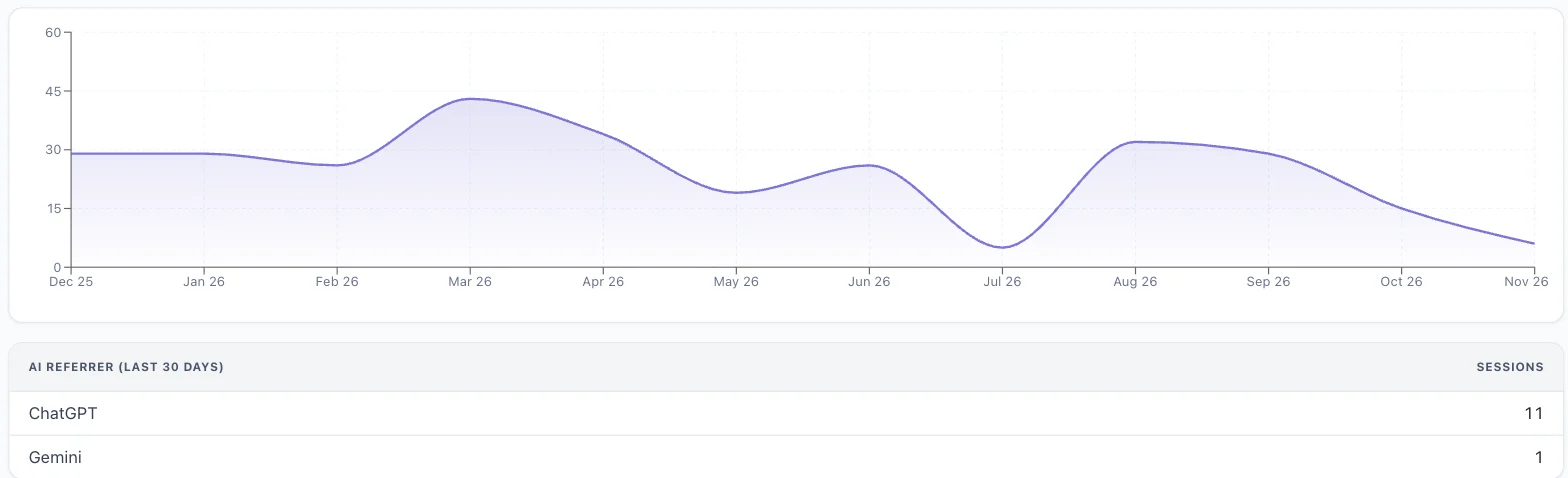
In the example above, AI assistants sent a law firm 293 sessions over 12 months. ChatGPT was the top source.
That's small next to organic search. Report it anyway, with conversions. An AI visitor who already got a recommendation tends to arrive further along than a cold search click, so watch what those sessions convert to, not just how many there are.
Two blind spots to know:
- App traffic can lose the referrer. Some clicks from AI apps show up as direct traffic.
- Zero-click answers never appear here. If the AI named the client and the user called them, GA4 sees nothing.
Set Up an AI Assistants Channel in GA4
A custom channel group in GA4 lets you pull every AI assistant into one channel instead of scattering them across Referral. Google's own custom channel groups help article uses an "AI assistants" channel as its example.
| Setting | Value |
|---|---|
| Channel name | AI assistants |
| Condition | Source matches regex |
| Pattern | .*(chatgpt|openai|perplexity|gemini\.google|copilot\.microsoft|claude\.ai).* |
| Position | Above Referral |
The steps:
- In GA4 Admin, under Data display, open Channel groups and copy the default group.
- Add a channel called AI assistants.
- Set the condition to Source matches regex, using the pattern in the table above.
- Move the channel above Referral. Google says traffic lands in the first channel it matches.
Update the pattern when new assistants show up. Standard GA4 properties allow two custom channel groups.
AI Bots in Your Server Logs
Every AI platform sends its own crawler, and some send a separate agent when a real person asks a question. Those user-triggered visits are the closest thing you'll get to AI impressions data from ChatGPT, Perplexity and Claude.
| User agent | Company | What it does | Allow it? |
|---|---|---|---|
| OAI-SearchBot | OpenAI | Indexes pages for ChatGPT search | ✓ Yes |
| ChatGPT-User | OpenAI | Visits when a user asks a question | ✓ Yes |
| GPTBot | OpenAI | Collects training data | ? Your call |
| PerplexityBot | Perplexity | Indexes pages for Perplexity answers | ✓ Yes |
| Perplexity-User | Perplexity | Visits when a user asks a question | ✓ Yes |
| Claude-SearchBot | Anthropic | Indexes pages for Claude search | ✓ Yes |
| Claude-User | Anthropic | Visits when a user asks a question | ✓ Yes |
| ClaudeBot | Anthropic | Collects training data | ? Your call |
Here's why that matters. OpenAI says ChatGPT-User visits a page when a user asks a question, and it's "not used for crawling the web in an automatic fashion," according to its bot documentation. Perplexity says the same of Perplexity-User in its crawler documentation, and Anthropic says Claude-User accesses sites when someone asks Claude a question, according to its crawler help article.
A spike in those user agents means real people asked questions that pulled the client's pages. Even if nobody clicked.
Check two things monthly:
- Access: robots.txt and the firewall aren't blocking the search and user agents. A blocked OAI-SearchBot means the site won't appear in ChatGPT search answers.
- Volume: user-agent hits by bot, trended month over month.
Ask Every Lead Where They Heard About You
Self-reported attribution means asking leads how they found the business, and adding "ChatGPT or another AI assistant" as an answer. It's the only way to catch the zero-click AI recommendation that turns into a phone call.
- ✓Website formRequired “How did you hear about us?” dropdown, with “ChatGPT or another AI assistant”
- ✓Intake scriptAsked on every new call
- ✓CRM lead sourceSo you count AI-sourced customers, not just visits
Add it in three places:
- The website form: a required "How did you hear about us?" dropdown.
- The intake script: the person answering the phone asks it on every new call.
- The CRM: a lead-source field, so you can count AI-sourced customers, not just AI-sourced visits.
It's imperfect. People misremember. But it's real customers, and that's what the client pays for.
Option 3: Sampled Prompts
Prompt tracking tools run questions through ChatGPT, Gemini, Perplexity, Copilot and Google's AI features, then record which brands and pages appear in the answers. This is the only way to measure zero-click visibility at scale.
It's also a sample. Every number is an estimate built from runs the tool chose to make.
- ?Prompt indexesThe tool picks the prompts
- ?Custom trackingYou pick the prompts
- ?Manual checksYou type them yourself
Prompt Indexes
A prompt index is a large database of prompts a tool runs on its own, so you can look up any brand without setting anything up. Ahrefs Brand Radar's Explore view reports on more than 449 million AI prompts across ChatGPT, Gemini, Perplexity, Copilot and AI Overviews, as of Nov 7, 2026.
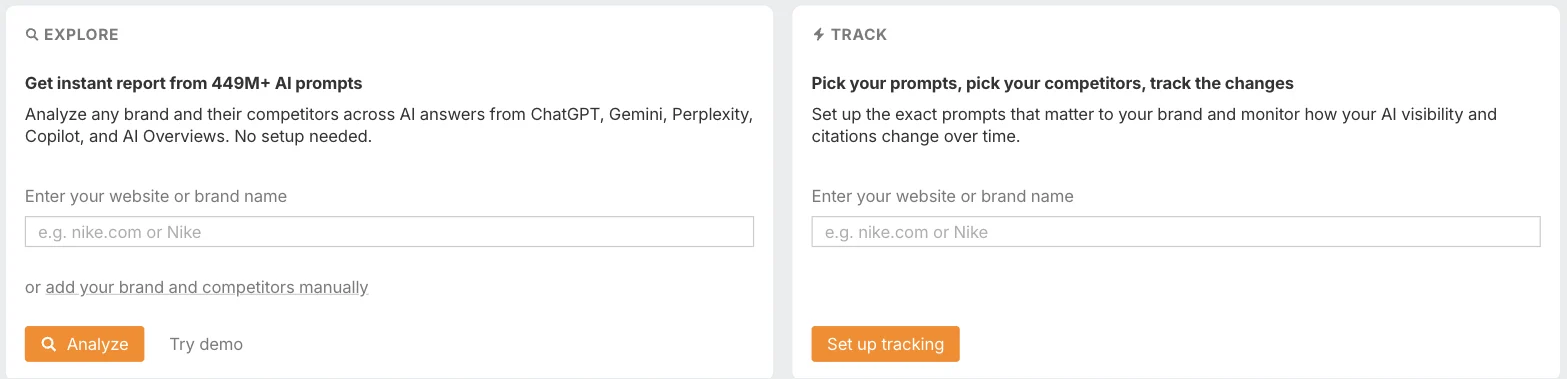
The upside: instant history and competitor data for any brand.
The downside: you don't choose the prompts. For a local business, most of the index is irrelevant, and the prompts that matter ("best car accident lawyer in [city]") may barely be in it.
We pull this data into the Generative Engine Visibility section of every Agency OS client report.
Custom Prompt Tracking
Custom prompt tracking runs a list of prompts you pick, on a schedule, and records whether the client and its competitors get named or cited. This is the closest thing to rank tracking in AI search.
You choose the 20 to 50 prompts the client's customers actually ask. The tool checks them daily or weekly.

It costs money per check. Our Ahrefs plan includes 600 checks a month, and the estimate above shows 885 more on pay-as-you-go for about $18, roughly 2 cents a check.
Do the math before you promise daily tracking. 50 prompts across 5 platforms, checked daily, is 7,500 checks a month. Weekly tracking is usually enough to see a trend.
Manual Prompt Checks
Manual checks are free and useful for spotting problems, like an AI giving the wrong phone number or saying the firm doesn't handle a case type it handles.
They're not tracking. One person, one location, one run.
A manual check
- ✕One person
- ✕One location
- ✕One run
- ✕Biased by history
Manual checks done right
- ✓Same prompts every month
- ✓Logged out or a fresh session
- ✓Three runs per prompt
- ✓Dated screenshots
If you do them, follow rules so the results are comparable month to month:
- Same prompts, same wording, every month.
- Logged out or in a fresh session, so history doesn't bias the answer.
- Run each prompt three times and record how many times the client appears.
- Screenshot every answer, with the date.
How Reliable Is Each GEO Data Source?
Here's every option side by side: how it's pulled, what it measures, and where it breaks.
| Method | How it’s pulled | Measures | Reliability | Blind spot |
|---|---|---|---|---|
| Search Console AI report | Reported by Google | AI Overview and AI Mode impressions | High | No clicks or queries; not every site yet |
| Bing AI Performance | Reported by Bing | Copilot citations, grounding queries | High | Copilot only; beta |
| GA4 AI referrals | Referrer and UTM on real visits | AI clicks and conversions | High | Zero-click answers; lost referrers |
| Server logs | User agents on real requests | Pages AI pulled for real users | High for counts | No idea what was said about you |
| Intake question | Leads tell you | AI-sourced leads | Medium | People misremember |
| Prompt index | Tool runs its own prompts | Citations, mentions, share of voice | Low to medium | You don’t pick the prompts |
| Custom prompts | Tool runs your prompts | Named or cited, vs. competitors | Medium | Sample; cost per check |
| Manual checks | You type prompts | Spot errors | Low | One person, one run |
The rule: report first-party data as fact, and sampled data as a trend. Never put a single prompt-tracking number in a report without the three months before it.
What Goes in a Monthly GEO Report
Keep it to the numbers that move decisions. Here's the section list we use.
| # | Section | What to write under it |
|---|---|---|
| 1 | AI-sourced leads | Intake answers and AI referral conversions, vs. last quarter |
| 2 | AI referral traffic | Sessions by assistant, and the pages they land on |
| 3 | Platform data | Search Console AI impressions, Bing citations and grounding queries |
| 4 | AI citations | Citations by platform, and share of voice vs. competitors |
| 5 | Bot access | Any blocked AI agents, and user-agent volume |
| 6 | Next month | Pages to fix or create, based on the gaps |
Lead with leads, the same rule as any client report. AI-sourced leads from the intake question and AI referral conversions go first, because that's what the client cares about.
Visibility comes second. Citations and impressions explain why the leads moved.
AI Citations by Platform
The citation table shows where the client gets named, and where they don't.
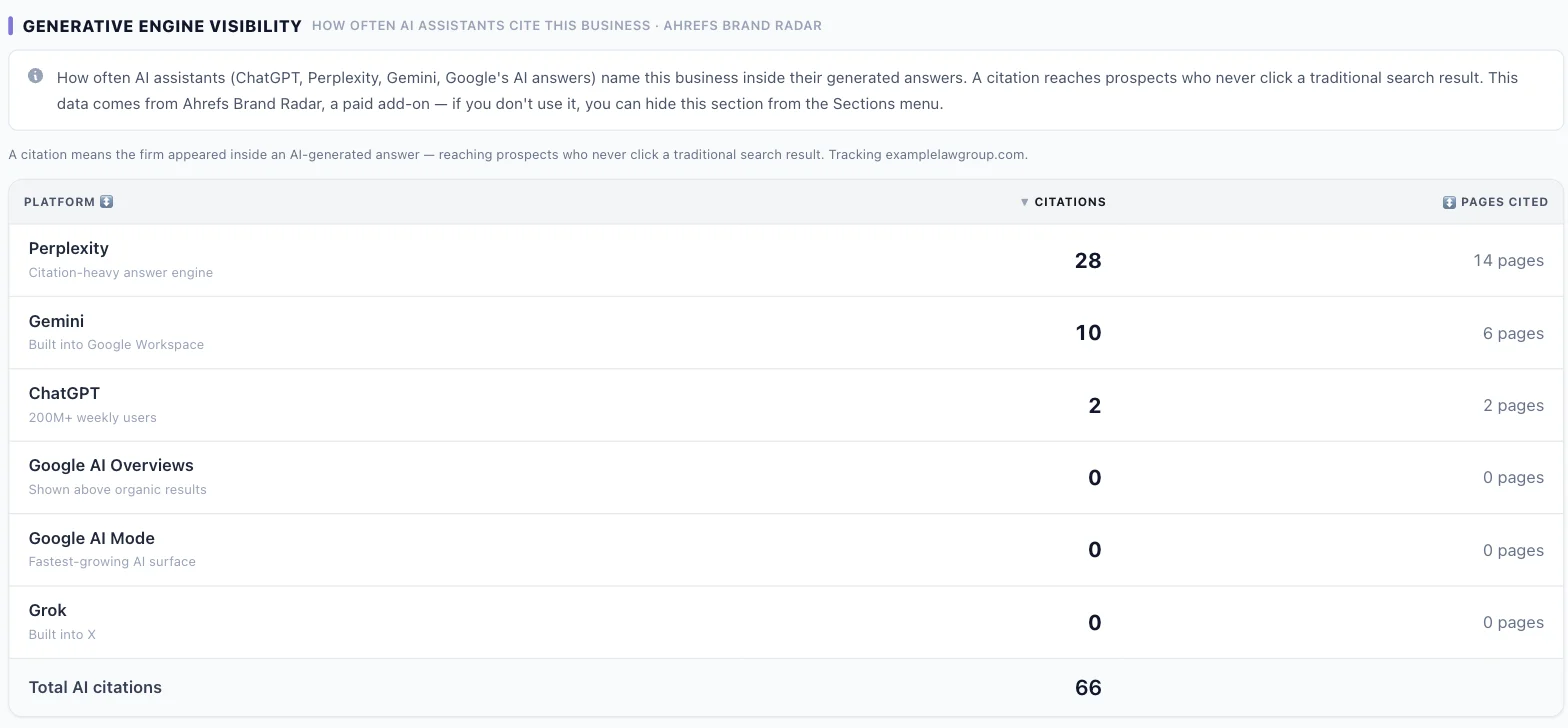
In this example, the firm earned 66 AI citations: 28 in Perplexity, 10 in Gemini, 2 in ChatGPT and none in Google's AI Overviews or AI Mode.
Zero AI Overview citations on a site that ranks on page one is a content problem. That's the strategy conversation the report should start, and the fix runs through your AI SEO process.
For the rest of the client's SEO numbers, see our SEO report template. AI referral traffic and citations sit inside it as two sections.
How to Read GEO Numbers Without Fooling Yourself
AI visibility data is noisy. Here's how to read it.
- ✓Three months vs. three monthsOne month is noise
- ✓Confirmed across sourcesCitations, referrals and intake all move
- ✓Against competitorsShare of voice, not a raw count
- ✓Note tracking changesNew prompts or tools reset the baseline
- Compare three months to the three before. A single month's swing usually means nothing.
- Only call a change when it holds across sources. If citations rise, AI referral traffic rises and the intake question picks up "ChatGPT," that's real.
- Compare against competitors, not zero. Share of voice against three competitors tells you more than a raw count.
- Watch for tracking changes. A new prompt list or a new tool resets the baseline. Note it in the report.
GEO Tracking Mistakes
- ✕One screenshot as visibility
- ✕Treating it like rankings
- ✕Only counting referral traffic
- ✕Blocking AI search bots
- ✕No intake question
- ✕Unpriced daily tracking
- ✕One month called a trend
- ✕Prompt index for a local client
- ❌ Reporting one prompt screenshot as visibility. It's one sample.
- ❌ Treating AI visibility like rankings. There's no position one.
- ❌ Only counting AI referral traffic. Most AI answers never get clicked.
- ❌ Blocking AI search bots. No access, no citations.
- ❌ No "how did you hear about us" question. You'll miss every zero-click AI lead.
- ❌ Promising daily prompt tracking without pricing the checks.
- ❌ Calling a one-month change a trend. Use three months.
- ❌ Using the prompt index for a local client. Track the prompts their customers actually ask.
AI Visibility Tracking FAQs
Can you track rankings in ChatGPT? Not like Google rankings. ChatGPT generates each answer fresh, so there's no fixed position. You can track how often a brand is named or cited across a set of prompts, which is a share, not a rank.
Does Google Search Console show AI Overviews data? Yes. AI Overviews and AI Mode traffic is included in the regular Performance report, and Google announced a separate generative AI report on June 3, 2026, showing AI impressions by page. At launch it rolled out to a subset of sites and didn't include clicks.
How do I see ChatGPT traffic in Google Analytics? Look for chatgpt.com as a source in GA4. ChatGPT adds utm_source=chatgpt.com to its links. Set up a custom "AI assistants" channel group so all AI sources show together.
How accurate are AI visibility tools? They're samples. They run a set of prompts and report what appeared, so results shift with prompt choice, wording, location and the day they ran. Use them for trends and competitor comparisons, not exact counts.
Which AI bots should I allow in robots.txt? To appear in AI search answers, allow the search and user agents: OAI-SearchBot and ChatGPT-User for ChatGPT, PerplexityBot and Perplexity-User for Perplexity, and Claude-SearchBot and Claude-User for Claude. Blocking training crawlers like GPTBot and ClaudeBot is a separate decision.
What's the most important GEO metric? AI-sourced leads: the intake question plus AI referral conversions. Citations and impressions explain why leads moved, but leads are what the client pays for.
Track the Leads AI Sends, Not Just the Mentions
Blueprint members get Agency OS with AI referral traffic and AI citations built into every client report, plus the training on how to sell and deliver SEO and GEO.
Join The Blueprint Training →