
"Just checking in" is the most ignored email in sales.
You send it because you can't remember what you talked about. The prospect can tell.
Here's how I fixed that. Every follow-up email I send now is written by AI, from the call notes, the proposal and every email I've traded with that prospect. Then I approve it and it goes out.
How do you write a sales follow-up email that gets a reply? Reference what the prospect actually told you: their goal, their last question, what they're waiting on. Connect Claude or ChatGPT to your CRM and it writes that email for every open proposal, from the call notes, the proposal and your email history.
Here's the short version:
- Specific beats persistent. A follow-up that quotes the prospect's own words gets read.
- AI can only write that email if it can see the context. You need a CRM that stores calls, proposals and emails in one place.
- Connect Claude or ChatGPT to that CRM over MCP and ask: "Go through my open proposals and write a follow-up for each."
- Approve every email before it sends. The AI drafts. You decide.
- Put it on a schedule, so nothing falls through the cracks.
Why Most Sales Follow-Up Emails Get Ignored
Because they're about you, not them.
"Just checking in." "Circling back." "Any update?" Every one of those asks the prospect to do the remembering for you.
A follow-up should move the deal forward, not just touch it. That means answering a question they asked, removing a reason they're waiting, or giving them something useful.
What gets ignored
- ✕"Just checking in"
- ✕"Circling back"
- ✕"Any update?"
What gets a reply
- ✓Answers their question
- ✓Removes what they’re waiting on
- ✓One clear next step
What a Good Sales Follow-Up Email Includes
Four things, in a few short lines:
- Their words. What they said on the call: the goal, the worry, the question.
- Where things stand. What they're waiting on, and what you're waiting on.
- One useful thing. An answer, a fix, or a next step they can take today.
- One clear ask. A time to talk, or a decision date.
No recap of your services. No "hope you're well." Short enough to read on a phone.
- ✓Their wordsThe goal, worry or question from the call
- ✓Where things standWhat each side is waiting on
- ✓One useful thingAn answer, a fix, a next step
- ✓One clear askA time to talk or a decision date
3 Real Follow-Up Emails AI Wrote From Our Pipeline
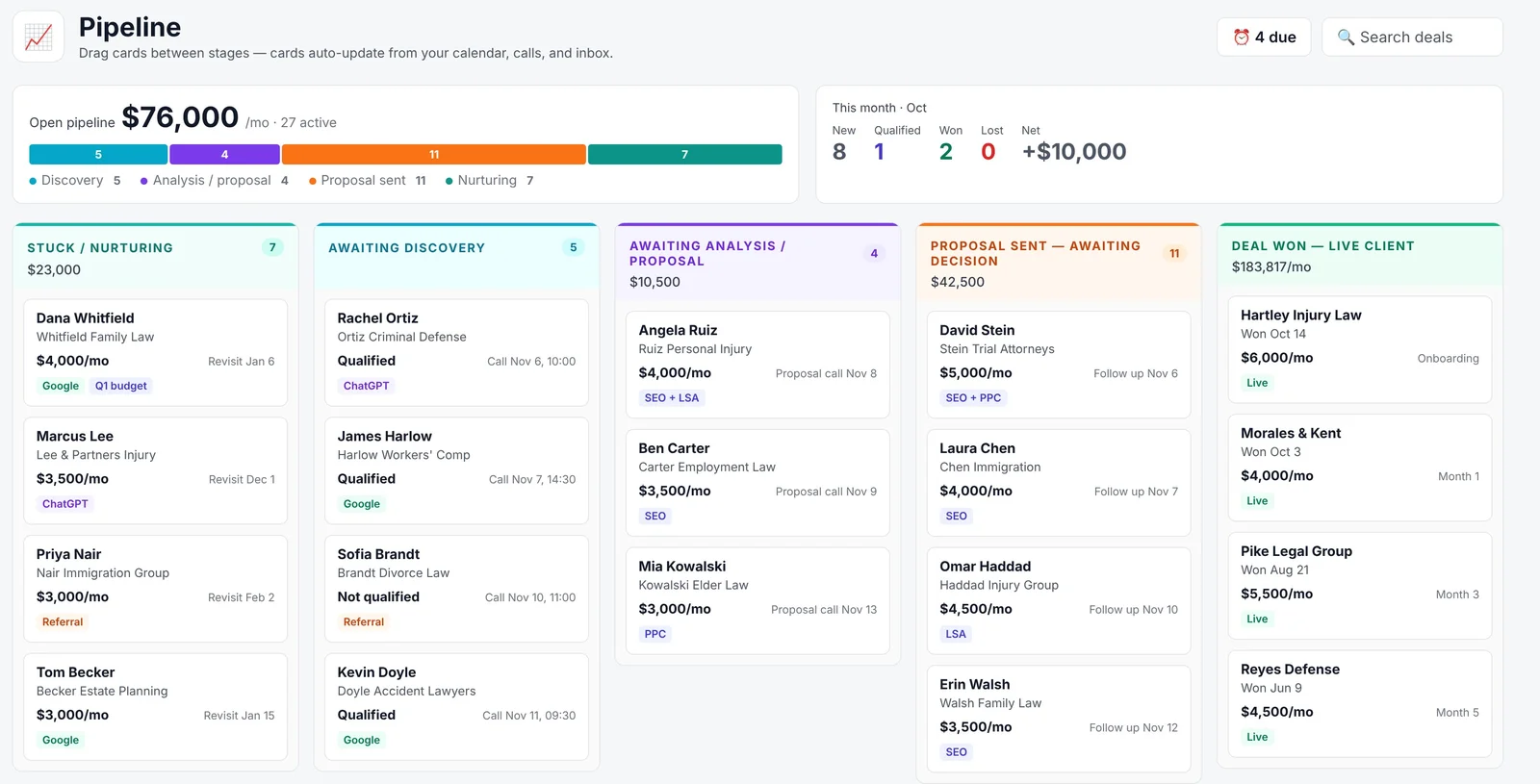
Right now we have 12 proposals waiting on a decision. The median one is 13.5 days since we last spoke.
I asked Claude to go through all 12 and draft follow-ups from the call notes and proposals in our CRM. Here are three of them, with names and identifying details removed.
The Prospect Who Asked Hard Questions
A firm unhappy with its current paid ads vendor. On the call, the owner asked about cost per case, how long before you can judge a campaign, and what spend it takes to get started. He also said he'd be "totally game" to film 5 to 8 videos a month.
The AI pulled all of that into the email. No "just checking in" anywhere.
Hi [Name],
On our call you asked three things: what cost per case looks like as a campaign optimizes, how long before you can judge one, and what spend it takes to get going in your market.
I put the answers on the forecast slide of your proposal, so you can see the math, not just my word for it.
You also said you’d be game to film 5 to 8 videos a month. That’s the part most firms can’t do, and it’s why I think this works for you.
Worth 15 minutes this week to walk through the forecast together?
Ryan
The Prospect Who's Waiting on Cash
A brand-new two-attorney firm. They told us the timing depends on a couple of settlements coming in over the next few months.
Pushing for a decision would kill the deal. So the AI wrote a nurture email instead: no pressure, and one free thing they can do now.
Hi [Name],
You mentioned the timing depends on a couple of settlements coming in. No pressure on the decision. The plan will be ready when you are.
One thing worth doing now that costs nothing: get your Google Business Profile verified and ask your first clients for reviews. It’s the first thing that starts working when we launch.
I’ll check back next month. Shout if anything changes before then.
Ryan
The One AI Told Me Not to Send
We'd met with this prospect two days earlier, on a call where we changed the scope.
The AI flagged it: don't send a follow-up. Send the updated scope from that call instead. That's the judgment a "day 3, day 7, day 14" sequence can't make.
You met with this prospect two days ago and changed the scope on that call.
A follow-up now repeats what you already said. Send the updated scope from that call instead.
Why AI Needs a Source of Truth
This is where most people get stuck with AI.
They open Claude or ChatGPT, paste in a few notes, and get a generic email back. There's no source of truth. The AI doesn't know who the prospect is, what they said or what you sent them.
You need a system that stores all of it in a database the AI can read.
What the AI Reads Before It Writes
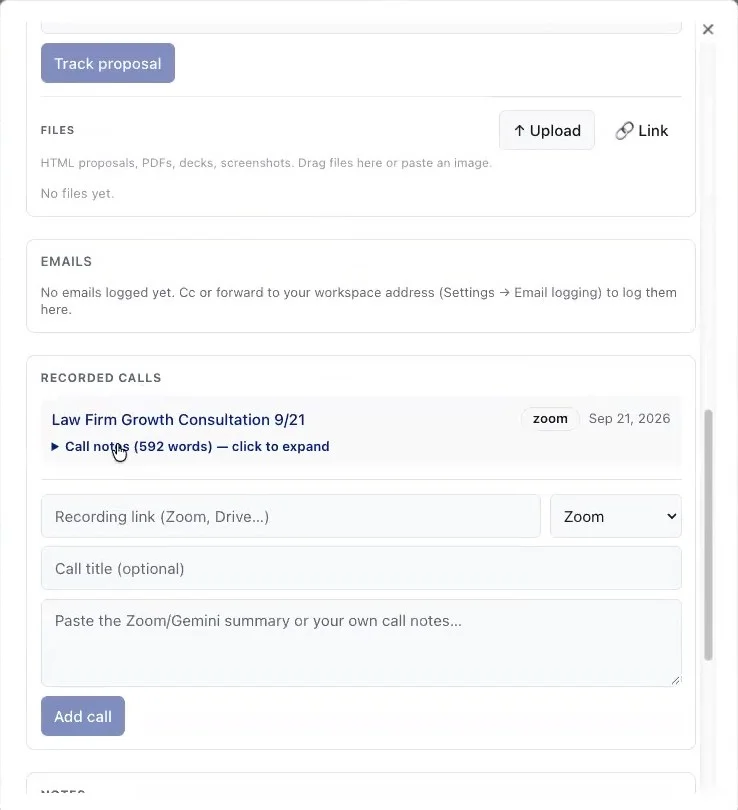
We use Agency OS. Every lead comes in from the booking form, with the qualification answers attached. Every call is recorded and summarized on the lead.
The proposal is built on the lead too. So when the AI opens a prospect, it sees the form answers, the call recordings and notes, the proposal, and the team's notes. With Gmail connected, it reads the email thread as well.
How to Automate Sales Follow-Ups With Claude or ChatGPT
Five steps. The first one is the hard part.
Step 1: Put Every Lead in One CRM
Forms, Calendly, HubSpot: whatever brings the lead in, it has to land in one place. One pipeline, with a stage for "proposal sent."
If you're still choosing, here's our comparison of the best CRM for marketing agencies.
Step 2: Connect Your AI to the CRM
The connection runs over MCP, the Model Context Protocol. It's an open standard Anthropic created for AI apps to connect to tools and data.
Both Claude and ChatGPT can connect to a remote MCP server. The plans differ, so check yours (details in the table below). Agency OS setup: connect Claude to Agency OS.
Sources: Claude Help Center and OpenAI Help Center, checked Nov 7, 2026.
| Claude | ChatGPT | |
|---|---|---|
| Custom MCP connectors | Free (1 connector), Pro, Max, Team, Enterprise | Full MCP on Business and Enterprise/Edu |
| Write actions (like sending) | Yes, with tool approvals | Business and Enterprise/Edu. Pro: read and fetch only |
| Where | Claude, Claude Desktop, Cowork | ChatGPT web |
Step 3: Run the Prompt
Here's the prompt I use. Nothing fancy:
"I need you to go through my open pipeline. Find anything that has a proposal open and write a follow-up email. Write them here for me to approve first."
It finds every prospect with a proposal out, reads the calls, notes and proposal, checks the email thread, and drafts one email per prospect. It also tells you which ones not to send.
“I need you to go through my open pipeline. Find anything that has a proposal open and write a follow-up email. Write them here for me to approve first.”
Step 4: Approve, Then Send
Read every draft. Edit the ones that are off. Then tell it which to send: "Approved. Send 1, 2, 5, 9, 10 and 12."
Never let it send without your approval. Both Claude and ChatGPT can ask for confirmation before actions like sending, and you should keep that on.
Because the AI is connected to the CRM, it can update the last-contact date when it sends. No manual logging.
Step 5: Put It on a Schedule
I have mine email me twice a week:
- Monday: every open proposal and the date of last contact.
- Friday: what closed this week, and what it recommends for next week.
That's brain space I don't spend anymore. Nothing falls through the cracks.
| Day | The email I get |
|---|---|
| Monday | Every open proposal and the date of last contact |
| Friday | What closed this week and what to do next week |
Claude vs. ChatGPT for Sales Follow-Ups
I ran the same prompt in both, side by side, in the video above. Both are really good.
Claude found the 12 leads in "proposal sent," checked my Gmail and wrote the drafts. ChatGPT went wider: 18 outstanding proposals, 11 in the active pipeline and 7 in nurture.
I skew toward Claude right now because I've built so much in it, so it has more context about me. I use it for the heavy agency work: proposals and deliverables. ChatGPT is my personal assistant for email.
| Claude | ChatGPT | |
|---|---|---|
| Same prompt found | 12 leads in proposal sent | 18 outstanding, 11 active + 7 nurture |
| Checked my email | Yes, Gmail | Yes |
| Where I use it | Proposals, deliverables, heavy agency work | Personal assistant, managing email |
Why a Bloated CRM Isn't the Answer
You can try to automate follow-ups inside a big sales platform. Sequences, triggers, templates.
I think that's a dead approach. A timed sequence doesn't know the prospect just told you they're at a conference until next week.
All you need is a simple platform that holds the data, and an AI connected to it. As the AI gets better, your follow-ups get better with it.
And because the CRM is shared, every rep, partner or teammate can connect their own AI to the same source of truth.
Timed sequence
- ✕Day 3, day 7, day 14
- ✕Same email to everyone
- ✕Doesn’t know what they said
AI on a source of truth
- ✓Reads every call and email
- ✓Different email per prospect
- ✓Knows when not to send
Sales Follow-Up Email Mistakes
- ❌ "Just checking in." Say something new.
- ❌ Recapping your services. They read the proposal.
- ❌ A fixed sequence for every prospect. Context beats cadence.
- ❌ Pushing a prospect who told you they're waiting. Nurture instead.
- ❌ Letting AI send without approval.
- ❌ AI with no source of truth. Generic in, generic out.
- ❌ Logging follow-ups by hand. Let the connected AI update the CRM.
- ✕"Just checking in"
- ✕Recapping your services
- ✕One sequence for everyone
- ✕Pushing a waiting prospect
- ✕Sending without approval
- ✕AI with no source of truth
- ✕Logging by hand
Sales Follow-Up Email FAQs
What should a sales follow-up email say? Reference what the prospect told you: their goal, their question, or what they're waiting on. Add one useful thing, like an answer or a next step, and end with one clear ask.
How many times should you follow up after sending a proposal? Until you get a real yes or no. Let the context decide the timing: a prospect waiting on cash needs a nurture email, not a weekly push. The full sales process is in how to sell SEO services.
Can AI write sales follow-up emails? Yes, if it can see the context. Connect Claude or ChatGPT to a CRM that stores your call notes, proposals and emails, and it writes a specific follow-up for each open deal.
Should AI send follow-up emails automatically? No. Let it draft, then approve each email before it sends. Both Claude and ChatGPT can ask for confirmation before taking actions like sending.
Is Claude or ChatGPT better for sales follow-ups? Both work well. Claude is my pick for heavy agency workflows like proposals. ChatGPT works well as a personal email assistant. On ChatGPT, full MCP with write actions is available on Business and Enterprise/Edu plans, while Pro users can connect custom MCP servers with read and fetch permissions.
Do I need a CRM to automate follow-ups with AI? Yes. The AI needs a source of truth with every lead, call, proposal and email in one database. Without it, you get generic emails.
Put Your Pipeline on Autopilot
Blueprint members get Agency OS with the pipeline, call recordings and proposal builder your AI can connect to, plus the full sales training and weekly live calls.
Join The Blueprint Training →