

Agencies don't lose deals on the sales call.
They lose them in the gaps.
The contact form nobody followed up on. The call nobody recorded. The proposal that went out three days late because nobody remembered what the prospect said.
A CRM is supposed to close those gaps. Most don't, because most CRMs were built for software sales teams, not agencies.
I'll be honest up front: we built our own. It's called Agency OS, and it's included with The Blueprint Training. So weigh my take accordingly.
We built it because agencies sell differently from software companies.
Here's what an agency CRM actually needs, how the big names stack up, and how to set up the pipeline no matter which one you pick.
Here's the short version:
- Agencies sell a few high-ticket retainers with a custom proposal every time. Pick a CRM for that, not for a 50-rep sales floor.
- The test: does it carry the context from the first call to the signed proposal without you retyping anything?
- HubSpot is the safe all-rounder. HighLevel is built for SMS-heavy, white-label agencies. Pipedrive is the cleanest cheap pipeline.
- Agency OS is built only for agency retainer sales: bookings in, call notes on the lead, proposal in five minutes, follow-ups on a schedule.
- Whatever you pick: one booking page, five stages, and every deal has a next date.
What Is an Agency CRM?
An agency CRM is customer relationship management software built around how agencies sell: booked calls, discovery, a custom proposal, follow-up, and a monthly retainer that turns into a client account.
That's different from a typical sales CRM. Those are built for high volume: hundreds of leads, email sequences, a team of reps, quotas.
Agencies sell differently. A handful of calls a week. Every deal needs its own proposal. And the moment a deal closes, the work starts, so sales and delivery need to talk to each other.
Software sales CRM
- ✕Hundreds of leads
- ✕Email sequences
- ✕Teams of reps
- ✕Sales ends at signature
Agency CRM
- ✓A few calls a week
- ✓A custom proposal every deal
- ✓One person, maybe two
- ✓Sales hands off to delivery
What to Look For: The 6-Point Agency CRM Checklist
Don't ask which CRM has the most features. Ask whether it does these six things.
- ✓Leads come in on their ownBookings land in the pipeline
- ✓Qualification on the leadForm answers, flagged
- ✓Call context on the leadRecordings and notes attached
- ✓Proposal from the leadThe context feeds the proposal
- ✓Stages move themselvesProposal sent? The deal moves.
- ✓Client work in the same placeSales context carries into delivery
1. Leads Come In on Their Own
Bookings from your calendar should land in the pipeline automatically, with the booking-form answers attached.
If you're copying leads in by hand, you'll miss some. And the ones you miss are the ones that booked at 10pm on a Sunday, ready to buy.
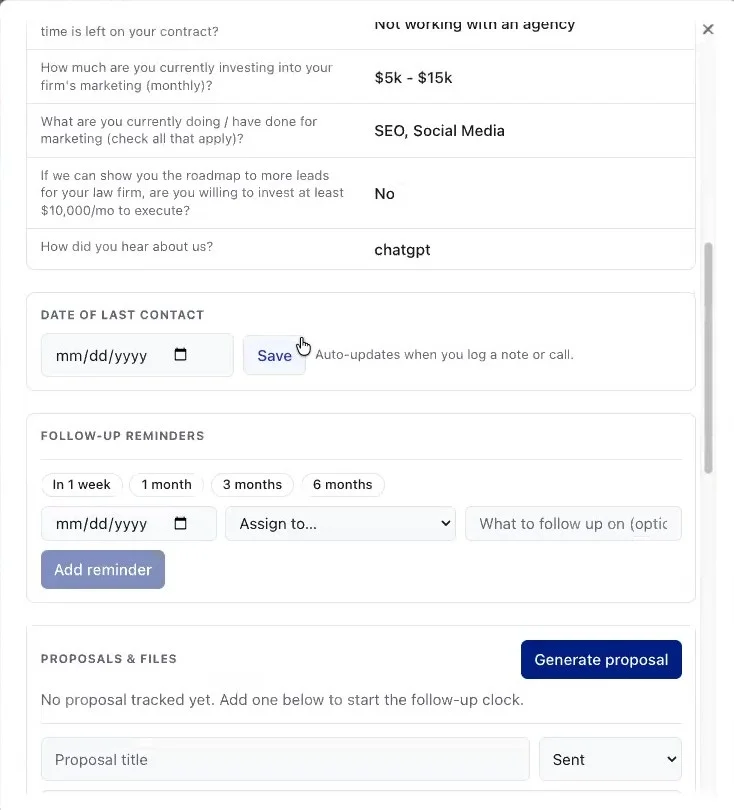
2. Qualification Answers Live on the Lead
Your booking form should ask the qualifying questions: current marketing spend, time left on their agency contract, whether they'd invest at your minimum.
Those answers belong on the lead, flagged qualified or not, before you ever get on the call.
| Booking form question | What it tells you |
|---|---|
| Are you actively investing in marketing? | Whether there’s a budget at all |
| How much time is left on your agency contract? | When they can actually switch |
| How much do you invest monthly? | Whether you’re in range |
| Would you invest at least [your minimum]? | The qualifier |
| How did you hear about us? | Which offer is working |
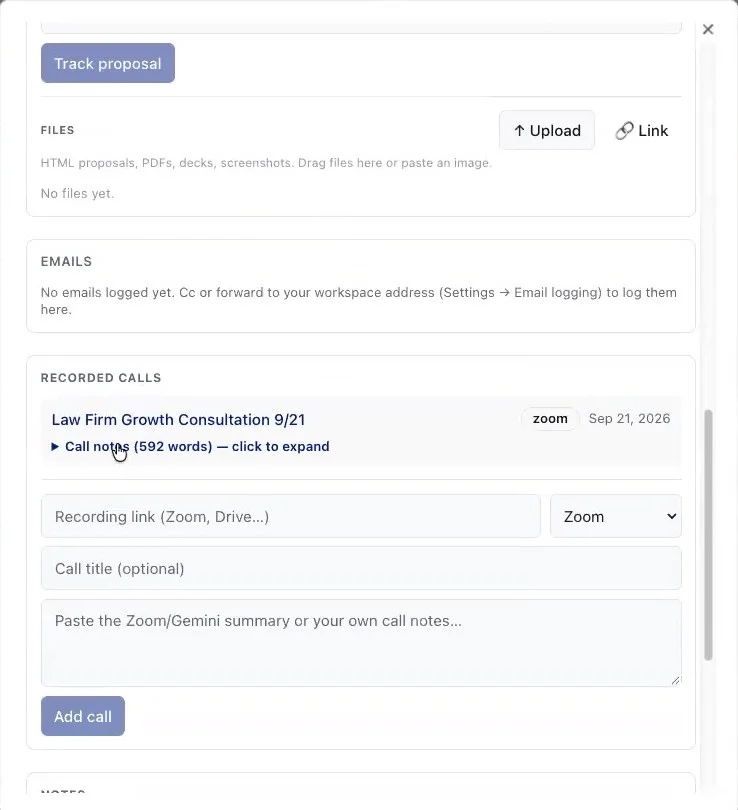
3. Call Recordings and Notes Attach to the Lead
This is the one most CRMs miss, and the one that loses deals.
If you build a proposal three days after the call and can't remember what they said, you lose. The lead record should show what they want, their pain points, and what went wrong with their last agency.
4. The Proposal Starts From the Lead
The call context should feed the proposal, not sit in a different tool.
In Agency OS, one click on the lead sends the call notes into the Proposal Builder. That's how a deep SEO proposal or PPC proposal goes out in about five minutes instead of three days.
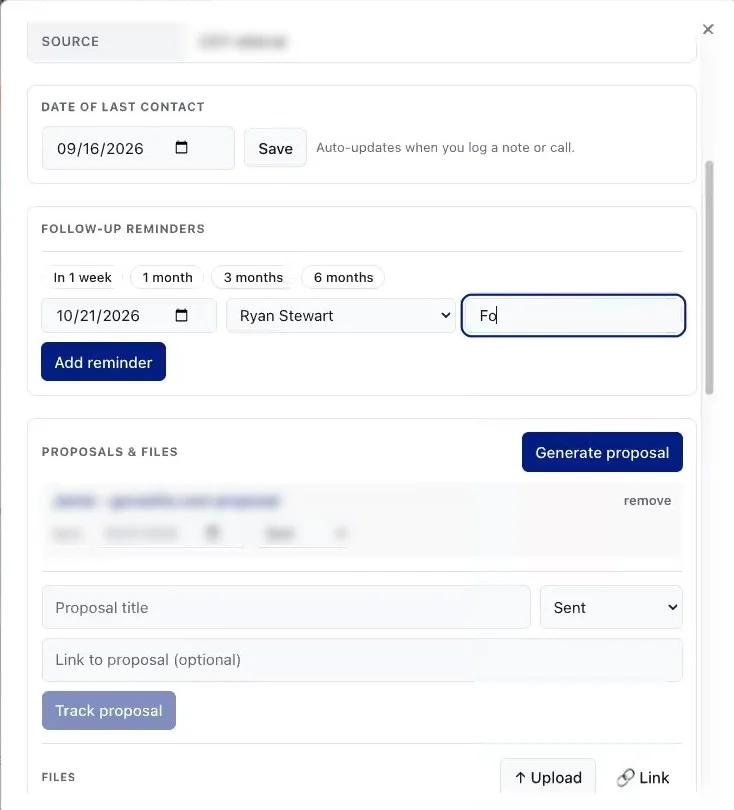
5. Stages Move Themselves
Send the proposal, and the deal should move to Proposal Sent on its own, with the link and the date logged.
If your pipeline only updates when you remember to drag a card, it's out of date by Wednesday.
6. Client Work Lives in the Same Place
When a deal closes, the client's projects, tasks and reporting should live in the same system.
Otherwise everything the prospect told you on the sales call stays in the CRM, and your delivery team starts from zero.
The Best CRMs for Marketing Agencies, Compared
Here's how four common choices stack up against that checklist. Prices are from each company's pricing page, checked on November 6, 2026.
| Agency OS | HubSpot Sales Hub | HighLevel | Pipedrive | |
|---|---|---|---|---|
| Starting price | $199/mo (with Blueprint) | Free; $20/seat Starter | $97/mo | $14/seat |
| Bookings into pipeline | ✓ | ✓ | ✓ | ✓ |
| Zoom/Meet recordings auto-attached | ✓ | Via integrations | Via integrations | Via integrations |
| Proposal built from the call | ✓ | ✕ | ✕ | ✕ |
| Client delivery after the sale | ✓ | Separate hub | Higher plans | Paid add-on |
| SMS / white label | ✕ | ✕ | ✓ | ✕ |
| Best for | Agency retainers | All-rounder | SMS, white label | Simple pipeline |
Agency OS: Built Only for Agency Retainer Sales
Best for: agencies selling SEO, paid search and other retainers who want sales and delivery in one place.
- ✅ Calendar bookings land in the pipeline, with form answers and a qualified flag
- ✅ Call recordings and notes attach to the lead
- ✅ One click from the lead to a finished SEO or PPC proposal
- ✅ Clients, projects and live reporting after the deal closes
- ❌ Not an email marketing or SMS platform
- ❌ No white-label resale
Price: included with The Blueprint Training at $199 a month, no contract. It runs with Claude, so you also need a Claude Pro or Team plan ($20 to $25 a month), billed separately.
HubSpot Sales Hub: The Safe All-Rounder
Best for: agencies that also want marketing automation and a big ecosystem, and have the budget to grow into it.
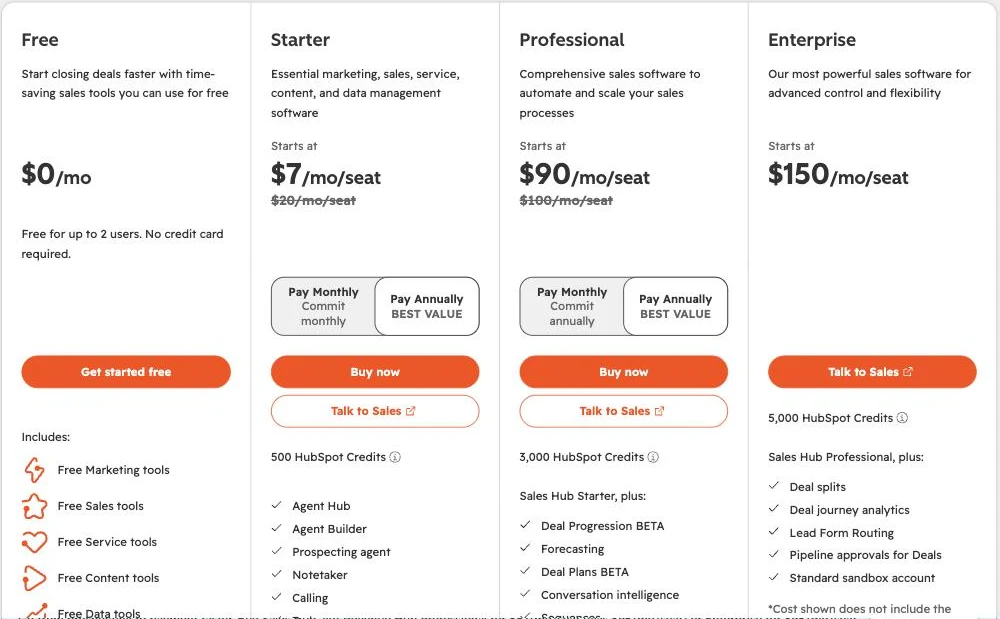
On HubSpot's pricing page, Sales Hub has a free plan for up to 2 users. Starter is listed at $20 per seat per month (currently $7 with an annual promotion). Professional is $100 per seat ($90 on the annual promotion) plus a $1,500 one-time onboarding fee.
- ✅ Mature pipelines, email tools, a huge integration library
- ✅ Call transcription and conversation intelligence on Professional
- ❌ The features agencies need most sit in Professional, with a per-seat price and onboarding fee
- ❌ No proposal built from your call notes; you still build proposals somewhere else
HighLevel: Built for SMS-Heavy, White-Label Agencies
Best for: agencies that run funnels, SMS and automations for lots of small clients, or want to resell software under their own brand.
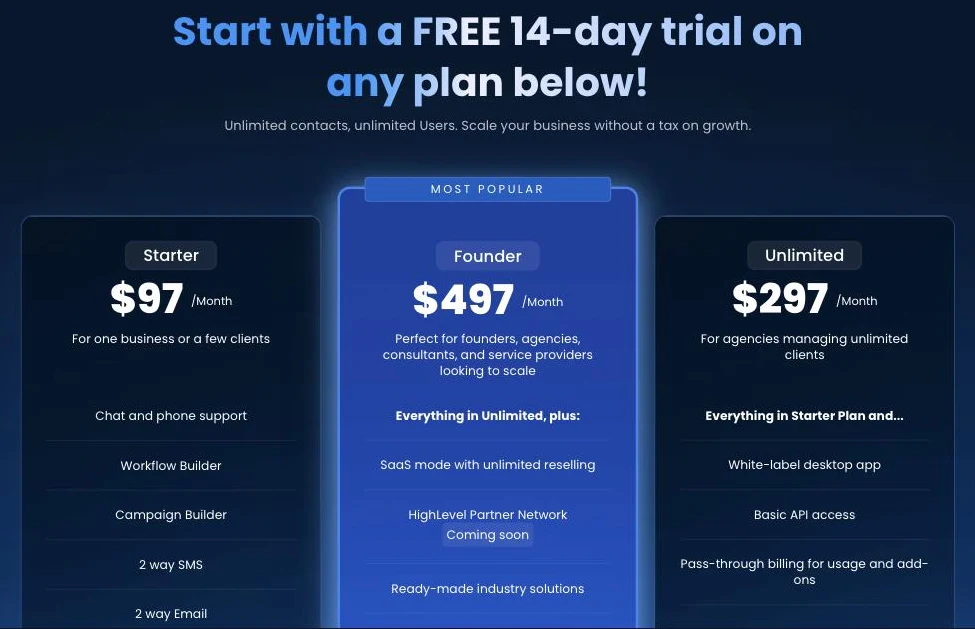
On HighLevel's pricing page, Starter is $97 a month, Unlimited is $297 a month, and Founder is $497 a month, with unlimited contacts and users. Phone, SMS, email and AI usage are billed on top.
- ✅ Funnels, calendars, SMS, email and workflows in one place
- ✅ White-label and resale options on higher plans
- ❌ Built around high-volume, low-ticket lead handling
- ❌ No proposal built from call notes; a lot to set up for a few high-ticket deals a month
Pipedrive: The Cleanest Cheap Pipeline
Best for: small agencies that just want a clean, visual pipeline and don't need much else.
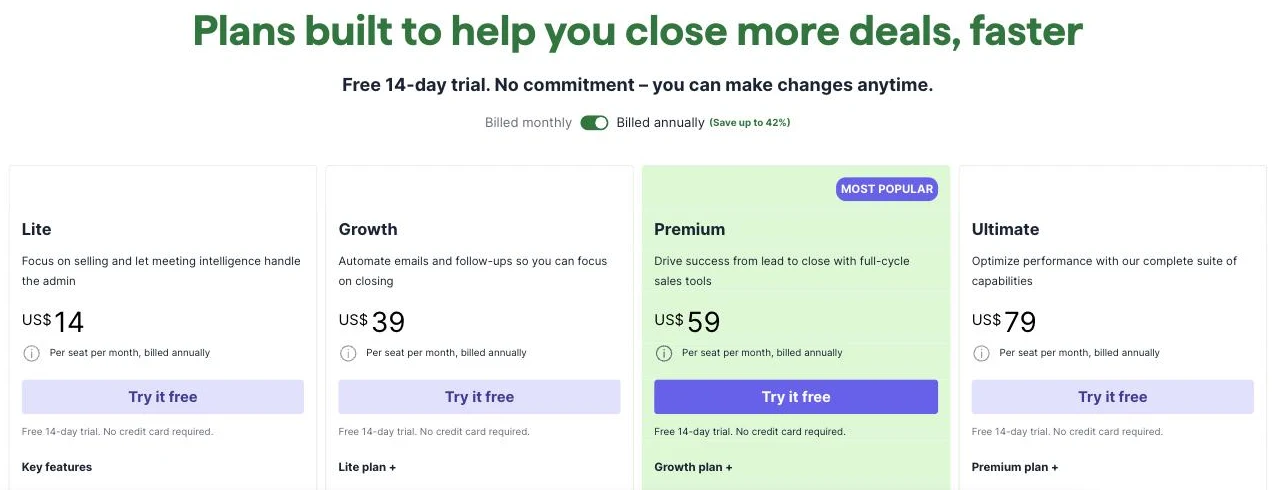
On Pipedrive's pricing page, plans run $14, $39, $59 and $79 per seat per month, billed annually. Automations start on Growth, and contracts and e-signatures on Premium.
- ✅ Simple, fast, visual pipeline
- ✅ Affordable for a small team
- ❌ Client projects are a paid add-on, separate from the sales pipeline
- ❌ No proposal built from call notes
What About a Spreadsheet?
I know what you're thinking: "I only get a few leads a month. A Google Sheet works fine."
It works until you have twelve open deals and three of them needed a follow-up last Tuesday. A spreadsheet can't remind you, can't hold a call recording, and can't build a proposal. The day you outgrow it is usually the day you lose a deal you should have won.
Spreadsheet
- ✕No reminders
- ✕No call recordings
- ✕No proposal
- ✕Out of date by Wednesday
CRM
- ✓Follow-ups on your Today view
- ✓Calls on the lead
- ✓Proposal from the lead
- ✓Stages update themselves
How to Set Up Your Agency Sales Pipeline
Whichever CRM you pick, the pipeline works the same way.
Start With One Point of Entry
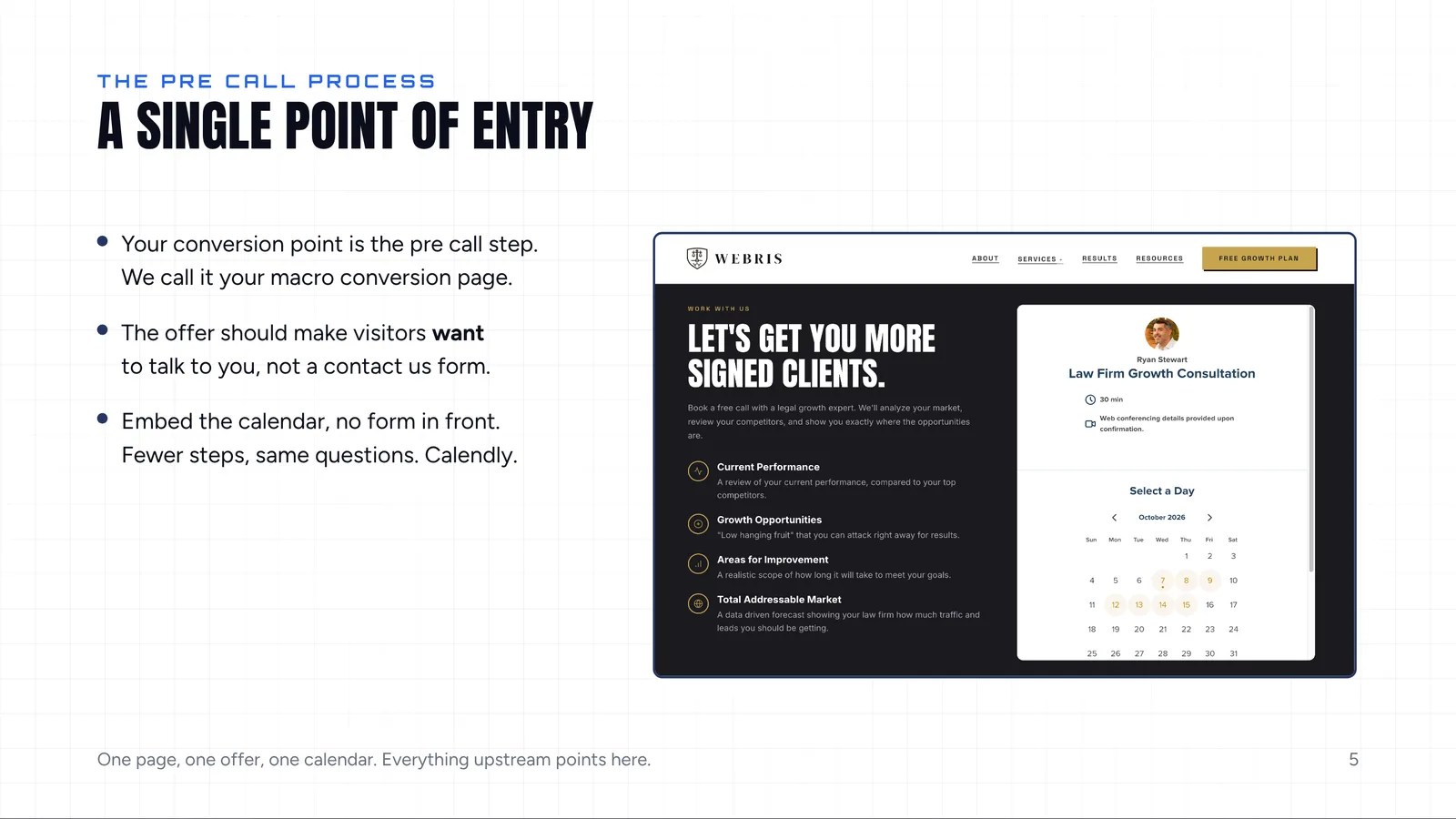
Your pipeline starts on your website. The last step there should be a booking calendar. Not a contact form.
A contact form adds a step: now you have to chase the lead just to get them on a call. If somebody wants to work with you, they'll pick a time.
"Never, ever, ever use web forms. I will die on this hill."
The rule: one page, one offer, one calendar.
Run more than one offer? Give each its own page and its own calendar, so you always know where a lead came from. Start with the 5-page agency website template.
Qualify Before the Call
Two booking-form settings do half the qualifying for you:
- Only allow bookings within 7 days. Further out than a week, people don't show.
- Ask your qualifying questions on the form. Spend, contract status, and whether they'd invest at your minimum. Ours asks about $10,000.
Unqualified? You'll know before the call, and you can decide whether to take it. The full question list is in our client questionnaire template.
- ✓Bookings within 7 days onlyFurther out, people don’t show
- ✓Qualifying questions on the formSpend, contract, minimum
- ✓One calendar per offerKnow where every lead came from
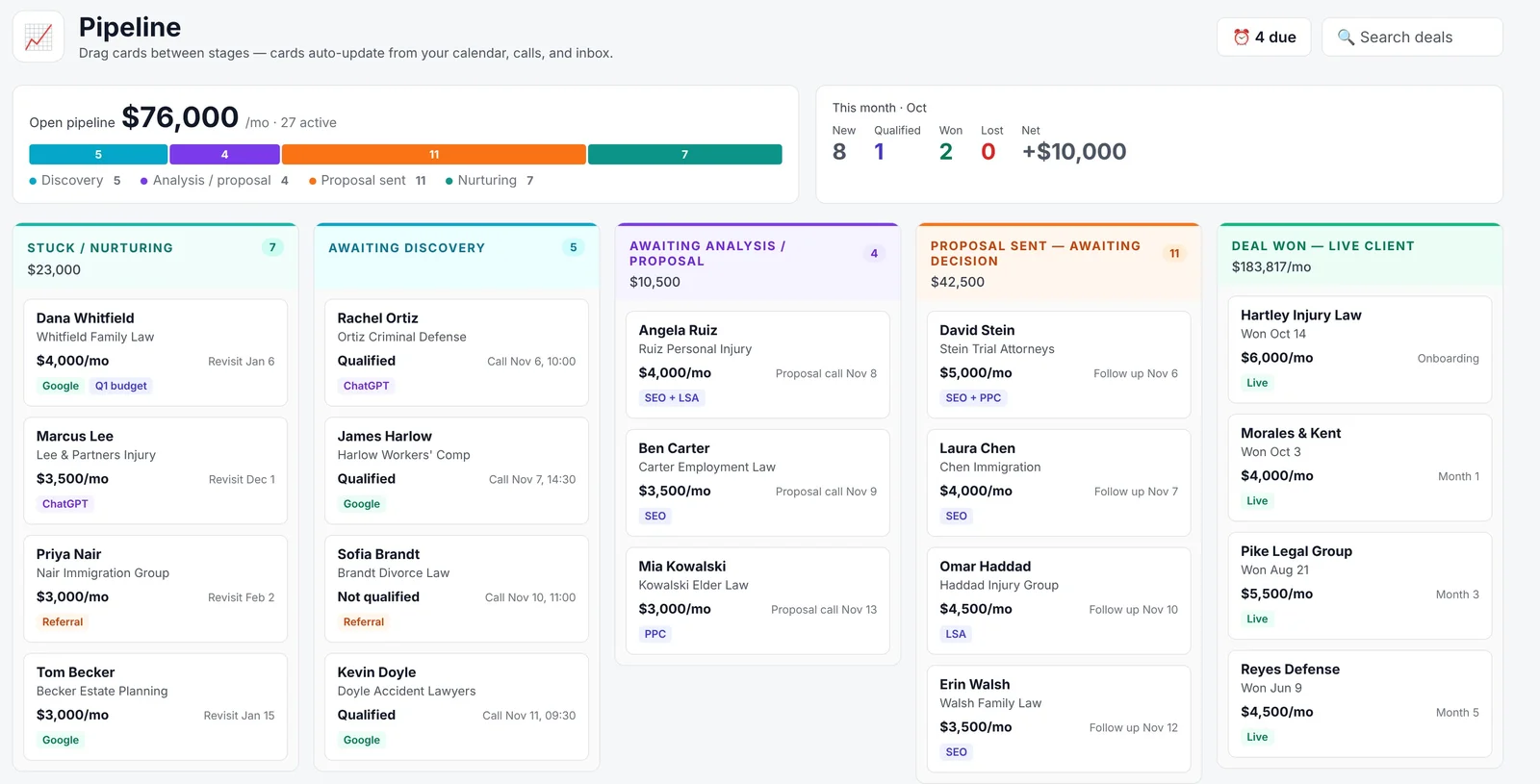
Use Five Stages
- Awaiting Discovery. They booked. The call hasn't happened.
- Awaiting Proposal. The call happened. The proposal is being built.
- Proposal Sent. It's in their hands, with a decision date.
- Deal Won. Signed. Hand off to delivery.
- Stuck Nurturing. Every "not yet."
Most agencies have the first four. Stuck Nurturing is the one that pays later. A prospect who says "let's revisit in Q1" isn't a lost deal. They get a reminder for Q1, and you move on.
Give Every Open Deal a Next Date
This is the rule that keeps a pipeline with hundreds of leads manageable.
Every open deal has a next date: a call, a decision date, or a follow-up reminder. No date means the deal is already dying.
You can see how deals move through the whole funnel in pipeline metrics and deal velocity.
| Stage | The next date is… |
|---|---|
| Awaiting Discovery | The call |
| Awaiting Proposal | The proposal call |
| Proposal Sent | Their decision date |
| Stuck Nurturing | When they asked you to come back |
Which Sales Automations to Run (and Which to Avoid)
Most agencies automate the wrong half of sales.
They automate the follow-ups, which is the part the prospect actually feels, and keep doing the busywork by hand. Flip it. Automate everything between the calls. Never automate the relationship.
"Don't automate your follow-ups. This is a highly personal, one-on-one process. That's what we do for low-ticket sales. This is not low ticket."
Let the system tell you when to follow up. Write the message yourself. The sequence I use is in how to sell SEO services without a sales rep.
| Automate | Keep human |
|---|---|
| Booking form → CRM | The discovery call |
| Call recordings and notes → the lead | The proposal call |
| Proposal build from call context | The final review of the proposal |
| Stage changes and follow-up reminders | The follow-up messages themselves |
How We Run Our Pipeline in Agency OS
Here's the exact setup at WEBRIS, start to finish, in the Agency OS CRM:
- A prospect books on our consultation page. Claude adds them to the pipeline in Awaiting Discovery, with the form answers and a qualified flag.
- We run the discovery call on Zoom. The recording and notes attach to the lead automatically.
- We click Generate proposal. The deck is ready in about five minutes.
- We send it. The deal moves to Proposal Sent on its own.
- We set the decision date as a follow-up reminder. It shows on the Today view.
- When they sign, the client's projects and live reporting start in the same place.
The setup guides are in the Help Center: pipeline basics and connecting Claude to Agency OS.
Agency CRM Mistakes to Avoid
- ❌ Buying for features you'll never use. Buy for the six-point checklist.
- ❌ A contact form instead of a calendar.
- ❌ Entering leads by hand. You'll miss the best ones.
- ❌ Proposals built in a different tool from the call notes.
- ❌ No Stuck Nurturing stage. "Not yet" isn't "no."
- ❌ Open deals with no next date.
- ❌ Automating the follow-up messages on a high-ticket deal.
- ✕Buying for unused features
- ✕A contact form instead of a calendar
- ✕Entering leads by hand
- ✕Proposals in a different tool
- ✕No Stuck Nurturing stage
- ✕Open deals with no next date
- ✕Automated follow-up messages
Agency CRM FAQs
What is the best CRM for a small marketing agency? One that brings bookings in automatically, keeps call notes on the lead, builds the proposal from them and reminds you to follow up. Pipedrive is the cheapest clean pipeline, HubSpot the safest all-rounder, HighLevel the pick for SMS and white-label work, and Agency OS the one built only for agency retainer sales.
Is HubSpot good for agencies? Yes, especially if you also want marketing automation. The catch is cost: the sales features agencies need most are in Sales Hub Professional, priced per seat with a $1,500 onboarding fee.
Should an agency use a contact form or a booking calendar? A booking calendar. A contact form adds a step, because you have to chase the lead to book a call. Put your qualifying questions on the booking form.
What stages should an agency sales pipeline have? Awaiting Discovery, Awaiting Proposal, Proposal Sent, Deal Won, plus Stuck Nurturing for prospects who aren't ready yet.
Which sales tasks should agencies automate? Lead intake, call capture, proposal builds, stage changes and reminders. Keep the calls and the follow-up messages personal.
Stop Running Your Pipeline on Memory
Agency OS is included with every Blueprint Training membership, along with the sales training that shows you how to run it.
Join The Blueprint Training →